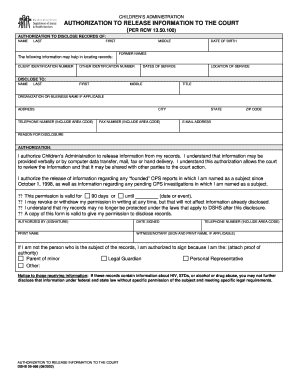
Cating records: CLIENT IDENTIFICATION NUMBER MIDDLE DATE OF BIRTH FORMER NAMES OTHER IDENTIFICATION NUMBER DATES OF SERVICE LOCATION OF SERVICE DISCLOSE TO: NAME LAST FIRST MIDDLE TITLE ORGANIZATION OR BUSINESS NAME IF APPLICABLE ADDRESS TELEPHONE NUMBER (INCLUDE AREA CODE) CITY FAX NUMBER (INCLUDE AREA CODE) STATE ZIP CODE E-MAIL ADDRESS REASON FOR DISCLOSURE AUTHORIZATION: I authorize Children’s Administration to release information from my records. I understand that in.
Loading
Open form follow the instructions
Easily sign the form with your finger
Send filled & signed form or save
How to fill out the WA DSHS 09-966 online
Filling out the WA DSHS 09-966 form is an important step in authorizing the release of your records to the court. This guide will provide you with a clear, step-by-step approach to complete this form effectively.
Follow the steps to complete your WA DSHS 09-966 form online.
- Press the ‘Get Form’ button to access the form and open it in your online document editor.
- In the first section, input the participant's details, such as their last name, first name, and middle name.
- Next, provide additional information to assist in locating records. This includes their client identification number, date of birth, any former names, other identification numbers, the dates of service, and the location of service.
- Move to the 'Disclose to' section. Here, fill out the details of the individual or organization that will receive the information, including their name, title, organization, address, phone number, city, fax number, state, zip code, and email address.
- In the 'Reason for Disclosure' section, provide a brief explanation as to why this information is being shared.
- Read through the authorization statement carefully. Ensure you understand that this authorization allows the court to review and potentially share the information with other parties involved in the court action.
- If applicable, specify the duration of this authorization by selecting either '90 days' or indicating a specific date or event.
- Sign and date the form in the 'Authorized By' section. If you are not the subject of the records, indicate your relationship to the subject and attach proof of your authority.
- If necessary, include a witness or notary signature in the designated area.
- Once complete, review your entries for accuracy, then proceed to save your changes, download, print, or share the filled-out form as needed.
Complete and submit your documents online to ensure your information is processed efficiently.
Experience a faster way to fill out and sign forms on the web. Access the most extensive library of templates available.
Related content
DCYF is a cabinet-level agency focused on the well-being of children. Our vision is to...
Get answers to your most pressing questions about US Legal Forms API.
How do I report changes to DSHS in Washington state?
To report changes to DSHS in Washington state, utilize the WA DSHS 09-966 online resources as they provide multiple channels for updating your information. You can either submit an online form or contact your local office for assistance. Make sure to inform them of any updates regarding your income, family situation, or residency. For thorough guidance throughout this process, consider using USLegalForms as a resource for your reporting needs.
What is the DSHS stop work form for Washington state?
The DSHS stop work form for Washington state, commonly referred to in relation to the WA DSHS 09-966, is a document used to cease certain reports for your benefits. This form is important if you experience a temporary change in your work status that affects your benefits. Understanding when and how to use this form can help prevent complications with your assistance. USLegalForms can help you navigate the requirements for this form effectively.
How do I report a change on Washington Health Plan Finder?
Reporting a change on the Washington Health Plan Finder is straightforward through the WA DSHS 09-966 platform. You can log in to your account and update your information directly within the portal. Make sure to report changes like income, household members, and residency to maintain accurate health coverage. If you need help with the process, USLegalForms offers resources that can clarify the steps for you.
How do I report a change to DSHS Washington?
To report a change to DSHS Washington, you should utilize the WA DSHS 09-966 system to ensure that your information is updated. You can either fill out an online form on their website or visit your local DSHS office for assistance. Ensure you have all necessary documents ready to facilitate the process. Using USLegalForms can provide valuable guidance on what documents you might need.
What is the phone number for DSHS food stamps in Washington state?
The phone number for DSHS food stamps in Washington state is available on the WA DSHS 09-966 website. You can easily find the contact information by navigating to the DSHS food assistance section. This number connects you to representatives who can assist with your inquiries regarding food stamps. Keeping this number handy can be very useful if you have questions or need to report changes.
How do I report changes to my Snap case?
To report changes to your Snap case, you can contact the WA DSHS 09-966 directly via their online portal or call your local office. It is important to report any changes promptly to ensure that your benefits reflect your current situation. This can include changes in income, household size, or other relevant factors. Using the USLegalForms platform can help you understand the necessary steps to report these changes efficiently.
How do I submit documents to DSHS Washington State?
Submitting documents to DSHS Washington State can be done through several methods, including online via Washington Connection and by mail. Be thorough and include all required information, such as your application number connected to the WA DSHS 09-966 form, to ensure efficient processing.
How do I send a fax to DSHS in Washington state?
To fax documents to DSHS in Washington state, locate the appropriate fax number for your local office on the DSHS website. Ensure you include a cover sheet with details like your name, case number, and the purpose of your fax, such as the WA DSHS 09-966 application documents you're sending.
How do I renew my SNAP benefits in Washington state?
Renewing your SNAP benefits in Washington state is straightforward. You can begin the renewal process online through the Washington Connection site. By completing the necessary sections of the WA DSHS 09-966 form, you can provide the required updates for a seamless renewal.
How to submit documents to DSHS Washington state?
To submit documents to DSHS Washington state, use the Washington Connection portal or mail them to your local office. Ensure you include any necessary identifiers like your case number and the WA DSHS 09-966 form to avoid delays. Always keep copies of submitted documents for your records.
Use professional pre-built templates to fill in and sign documents online faster. Get access to thousands of forms.
If you believe that this page should be taken down, please follow our DMCA take down process here.