Loading
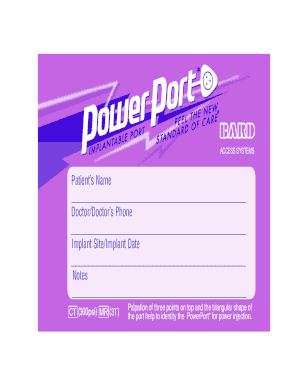
Get Download Patient Identification Card - Powerportadvantage
How it works
-

Open form follow the instructions
-

Easily sign the form with your finger
-

Send filled & signed form or save
How to fill out the Download Patient Identification Card - PowerPortAdvantage online
The Download Patient Identification Card - PowerPortAdvantage is a crucial document for users requiring information about their PowerPort implant. Filling out this form accurately ensures clear communication between healthcare providers and users regarding important medical information.
Follow the steps to complete the form efficiently.
- Press the ‘Get Form’ button to retrieve the form and open it for editing.
- Begin filling out the patient's name in the designated field, ensuring it is spelled correctly. This identifies the individual for whom the card is being completed.
- Next, input the doctor's name and their contact number. This information is essential for any follow-up communication needed regarding the patient's care.
- Record the implant site and the date of the implant. Accurate information here helps in tracking the device for medical purposes.
- In the notes section, provide any relevant notes regarding the patient's condition or specifics about the PowerPort, such as palpation points or additional instructions.
- If applicable, attach the product identification sticker from the unit label in the provided area.
- Once all fields are filled out, review the information for accuracy. Make any necessary corrections.
- After that, choose to save your changes, download the completed document, print it out, or share it as needed.
Complete your documents online today for efficient management of your health information.
Related links form
Application For Alteration Of Nonconforming Buildings And Structures - Farmington Utah
General Plan Amendment Application - Farmington City, Utah - Farmington Utah
Nonconforming Use Application To The Board Of Adjustment Fee: $150.00 - Farmington Utah
PERMITTED USE APPLICATION - Farmington City, Utah - Farmington Utah
If you need a new card, please reach out to your doctor. You can download and print a copy, or have your doctor send you a new one. Your doctor will need to provide device information for your new stent implant card.