Loading
Form preview
  • US Legal Forms
  • Form Library
  • More Forms
  • More Multi-State Forms
  • Td Registered Account Transfer Form

Get Td Registered Account Transfer Form

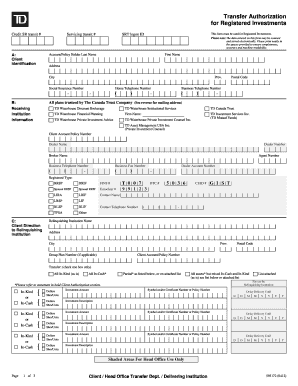
Transfer Authorization for Registered Investments Credit SR transit # Servicing transit # This form must be used for Registered Investments. Please note: The data entered on this form may be scanned.

How it works

  1. Open form

    Open form follow the instructions

  2. Easily sign form

    Easily sign the form with your finger

  3. Share form

    Send filled & signed form or save

How to fill out the Td Registered Account Transfer Form online

Transferring your registered investments can seem daunting, but filling out the Td Registered Account Transfer Form online can streamline the process. This guide will provide you with clear steps to successfully complete the form with confidence.

Follow the steps to fill out the form accurately.

  1. Click ‘Get Form’ button to download the Td Registered Account Transfer Form and access it for editing.
  2. Begin by entering your client identification details. Fill in your last name, first name, home address, city, province, postal code, and contact numbers. Ensure that you write clearly to maintain machine readability.
  3. In the section labeled 'Receiving Institution Information,' specify the name and details of the institution you are transferring your accounts to, including your account policy number and the dealer’s contact information.
  4. Navigate to the 'Client Direction to Relinquishing Institution' section. Here, indicate the type of registered account being transferred, such as RRSP, RRIF, or TFSA, and provide any additional account numbers or relevant information needed.
  5. In the 'Transfer' section, select the appropriate transfer method. You can choose between 'All In-Kind,' 'All In-Cash,' or 'Partial' transfers by checking the box next to your choice.
  6. For each investment you want to transfer, fill out the investment amount and description, specifying whether it should be transferred in cash or in kind. Repeat this process for all assets you wish to transfer.
  7. Complete the 'Client Authorization' section by reading the statement carefully. Sign and date the form to indicate your consent for the transfer and acknowledge any fees that apply.
  8. Finally, review all entered information for accuracy. Once satisfied, save changes to the form, and proceed to download, print, or share the completed form as needed.

Complete your Td Registered Account Transfer Form online today to ensure a smooth transfer process.

Get form

Experience a faster way to fill out and sign forms on the web. Access the most extensive library of templates available.
Get form

Related content

Transferring your Brokerage Account: Tips on ......
Apr 16, 2009 — Many investors transfer their accounts from one brokerage firm to another...
Learn more
TD Bank | Accounts Payable | Rowan University
Steps for Pre-Approval. forms Gift Card Request Form. Custodian/Study Coordinator...
Learn more
TD Canada Trust - Wikipedia
All new and most existing accounts are officially issued by TD Bank (Institution Number:...
Learn more

Related links form

Tennant Secretary Of State 1900 Kanawha Blvd E Bldg 1, Suite 157-K Charleston, WV 25305 FILE ONE Bldg 1, Suite 157-K Charleston, WV 25305 FILE ONE ORIGINAL (Two If You Want A Filed Stamped Copy LLP-1 - West Virginia Secretary Of State - State Of West Virginia Forms For Business And Licensing - West Virginia Secretary Of State

Questions & Answers

Get answers to your most pressing questions about US Legal Forms API.

Contact support

Our Online Banking customers can transfer funds between their personal TD Bank accounts as well as to or from their accounts outside TD Bank*.

You are able to transfer an RRSP to a different financial institution by authorizing the transfer of your funds. You can initiate the transfer through the receiving financial institution. One or both of the financial institutions involved may charge you a transfer fee.

TD Global Bank Transfer: 1-54 business days.

You can make a withdrawal from your RRSP any time1 as long as your funds are not in a locked-in plan. The withdrawal, however, is subject to withholding tax and the amount also needs to be included as income when filing your taxes. There are situations in which tax-deferred withdrawals can be made from your RRSP.

RSPs (Retirement Savings Plans) and RRSPs are different names for the same retirement savings plan that is registered with the Federal Government.

When the RSP is open, complete a registered account transfer form and bring it to any TD Canada Trust branch. At this time, you will also be able to designate a beneficiary for your RSP. Visit a TD location and we can help you open and transfer your account with you: locate a branch.

Step 1: Go to transfer. Select the Transfer icon from the top menu on the home screen. ... Step 2: Enter transfer details. Select the account you'd like to transfer money from using the From Account dropdown menu. ... Step 3: Review and confirm.

If you're transferring cash or securities from another brokerage to your TD Direct Investing account, give them the following information: FINS (institution number): T007. CUID (CDN Broker Code): GIST. DTC (US Broker Code): 5036. Dealer Code: 9265. DSC Rep Code: 0000. Account # 1253 – Your TD Direct Investing Account number.

Get This Form Now!

Use professional pre-built templates to fill in and sign documents online faster. Get access to thousands of forms.
Get form
If you believe that this page should be taken down, please follow our DMCA take down processhere.
Get Td Registered Account Transfer Form
Get form
  • Adoption
  • Bankruptcy
  • Contractors
  • Divorce
  • Home Sales
  • Employment
  • Identity Theft
  • Incorporation
  • Landlord Tenant
  • Living Trust
  • Name Change
  • Personal Planning
  • Small Business
  • Wills & Estates
  • Packages A-Z
  • Affidavits
  • Bankruptcy
  • Bill of Sale
  • Corporate - LLC
  • Divorce
  • Employment
  • Identity Theft
  • Internet Technology
  • Landlord Tenant
  • Living Wills
  • Name Change
  • Power of Attorney
  • Real Estate
  • Small Estates
  • Wills
  • All Forms
  • Forms A-Z
  • Form Library
  • Legal Hub
  • About Us
  • Help Portal
  • Legal Resources
  • Blog
  • Affiliates
  • Contact Us
  • Delete My Account
  • Site Map
  • Industries
  • Forms in Spanish
  • Localized Forms
  • State-specific Forms
  • Forms Kit
  • Real Estate Handbook
  • All Guides
  • Notarize
  • Incorporation services
  • For Consumers
  • For Small Business
  • For Attorneys
  • USLegal
  • FormsPass
  • pdfFiller
  • signNow
  • altaFlow
  • DocHub
  • Instapage
Form Packages
  • Adoption
  • Bankruptcy
  • Contractors
  • Divorce
  • Home Sales
  • Employment
  • Identity Theft
  • Incorporation
  • Landlord Tenant
  • Living Trust
  • Name Change
  • Personal Planning
  • Small Business
  • Wills & Estates
  • Packages A-Z
Form Categories
  • Affidavits
  • Bankruptcy
  • Bill of Sale
  • Corporate - LLC
  • Divorce
  • Employment
  • Identity Theft
  • Internet Technology
  • Landlord Tenant
  • Living Wills
  • Name Change
  • Power of Attorney
  • Real Estate
  • Small Estates
  • Wills
  • All Forms
  • Forms A-Z
  • Form Library
Customer Service
  • Legal Hub
  • About Us
  • Help Portal
  • Legal Resources
  • Blog
  • Affiliates
  • Contact Us
  • Delete My Account
  • Site Map
  • Industries
  • Forms in Spanish
  • Localized Forms
  • State-specific Forms
  • Forms Kit
Legal Guides
  • Real Estate Handbook
  • All Guides
Prepared for you
  • Notarize
  • Incorporation services
Our Customers
  • For Consumers
  • For Small Business
  • For Attorneys
Our Sites
  • USLegal
  • FormsPass
  • pdfFiller
  • signNow
  • altaFlow
  • DocHub
  • Instapage
Social Media
Call us now toll free:
+1 833 426 79 33
As seen in:
© Copyright 1999-2026 airSlate Legal Forms, Inc. 3720 Flowood Dr, Flowood, Mississippi 39232
  • Your Privacy Choices
  • Terms of Service
  • Privacy Notice
  • Content Takedown Policy
  • Bug Bounty Program