Loading
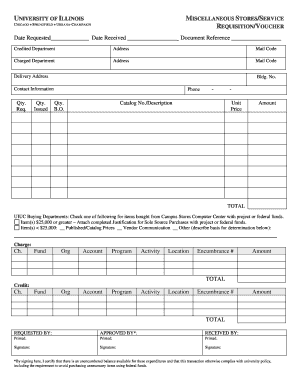
Get Miscellaneous Storesservice Requisitionvoucher Ms Word - Oae Uic
How it works
-

Open form follow the instructions
-

Easily sign the form with your finger
-

Send filled & signed form or save
How to use or fill out the Miscellaneous Stores/Service Requisition/Voucher MS Word - Oae Uic online
This guide provides essential instructions for accurately completing the Miscellaneous Stores/Service Requisition/Voucher form. Follow the outlined steps to ensure your submission is properly filled out and meets all necessary requirements.
Follow the steps to effectively fill out the form online.
- Press the ‘Get Form’ button to access the Miscellaneous Stores/Service Requisition/Voucher form and open it in your preferred editor.
- In the 'Date Requested' field, enter the date on which you are submitting the requisition.
- Fill in the 'Date Received' section once the items are received.
- Provide the 'Document Reference' number if applicable.
- Complete the 'Credited Department' section by entering the name of the department to which the costs will be charged.
- Input the address and mail code for the credited department.
- In the 'Charged Department' section, fill out the name and address of the department that will be incurring the charges.
- Specify the delivery address, including the building number.
- Enter the contact information including a phone number for reaching the responsible person.
- In the 'Qty. Req.' column, indicate the quantity of items you are requesting.
- In the 'Qty. Issued' column, input the quantity of items that have been issued.
- For back orders, specify the quantity in the 'Qty. B.O.' column.
- Provide the catalog number and description of the items requested.
- Fill in the unit price for each item and calculate the total amount.
- Complete the section on purchasing justification for items priced at $25,000 or greater if applicable.
- Fill out the charge account information including charge, fund, org, account, program, activity, location, and encumbrance number.
- Enter the amount and total for the charges.
- If applicable, provide credit information in the credit section, ensuring all fields are accurately filled.
- Identify the requester by entering their name in the 'Requested By' section.
- Once approved, complete the 'Approved By' and 'Received By' sections with printed names and signatures.
- Finally, review all the information for accuracy and completeness before you save the changes, download the document, print, or share it as needed.
Complete your documents online to ensure swift processing!
Industry-leading security and compliance
US Legal Forms protects your data by complying with industry-specific security standards.
-
In businnes since 199725+ years providing professional legal documents.
-
Accredited businessGuarantees that a business meets BBB accreditation standards in the US and Canada.
-
Secured by BraintreeValidated Level 1 PCI DSS compliant payment gateway that accepts most major credit and debit card brands from across the globe.