Loading
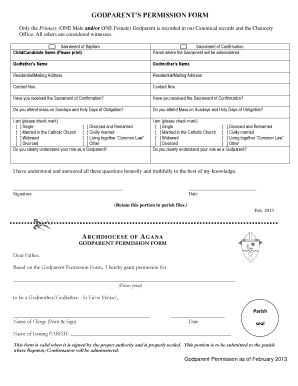
Get Godparents Permission Form - Aganaarch
How it works
-

Open form follow the instructions
-

Easily sign the form with your finger
-

Send filled & signed form or save
How to fill out the Godparents permission form - Aganaarch online
The Godparents permission form is an important document required for the baptism and confirmation of a child. This guide will help you understand each section of the form and provide you with step-by-step instructions to complete it accurately online.
Follow the steps to fill out the Godparents permission form online.
- Click the ‘Get Form’ button to obtain the form and open it in the editor.
- Begin by entering the name of the child or candidate for the sacrament of baptism. Please print this clearly.
- Next, indicate the sacrament of confirmation and the parish where this will take place.
- Fill in the godfather’s name and godmother’s name as required.
- Provide the residential or mailing address for both the godfather and godmother.
- Enter the contact numbers for both the godfather and godmother.
- Indicate if the godfather and godmother have received the sacrament of confirmation.
- Answer whether they attend mass on Sundays and holy days of obligation.
- Select the appropriate status (e.g., single, divorced, married) for both the godfather and godmother.
- Confirm understanding of their role as a godparent.
- Each godparent must sign the form, affirming honesty in their responses and knowledge of their role.
- Record the date of signing.
- Complete any additional required portion for parish records and ensure the form is properly sealed by the parish.
- Finally, save the changes, download the form, and print or share it as needed.
Complete the Godparents permission form online today and ensure all necessary details are submitted.
A godparent should be a confirmed, Catholic Christian who is at least 16 years of age, and who faithfully practices and believes in the Catholic faith as a participating member of a parish community.