Loading
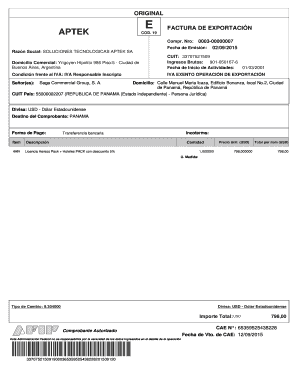
Get Aptek Argentina Form
How it works
-

Open form follow the instructions
-

Easily sign the form with your finger
-

Send filled & signed form or save
How to fill out the Aptek Argentina Form online
Filling out the Aptek Argentina Form online is a straightforward process designed to facilitate the export invoicing procedure. This guide provides step-by-step instructions to help you navigate each section of the form with ease.
Follow the steps to complete the Aptek Argentina Form online.
- Press the ‘Get Form’ button to access the Aptek Argentina Form and open it for editing.
- Enter the 'Compr. Nro' section with the relevant invoice number. This uniquely identifies your export invoice.
- Fill in the 'Fecha de Emisión' field with the date the invoice is issued, ensuring it is formatted correctly.
- In the 'Razón Social' section, input the full business name 'Soluciones Tecnologicas Aptek SA' as the issuer of the invoice.
- Provide the 'Domicilio Comercial' which is the commercial address of the issuer located in Buenos Aires, Argentina.
- Complete the 'CUIT' field with the tax identification number 33707521509 related to the issuer.
- Include 'Ingresos Brutos' number as required in the space provided.
- Fill in the 'Fecha de Inicio de Actividades' to indicate when the business began its activities.
- Check the 'Condición frente al IVA' box to confirm the IVA status as 'IVA Responsable Inscripto'.
- For the recipient details, enter the 'Señor(es)' field with 'Saga Commercial Group, S. A.'.
- Fill in the recipient's 'Domicilio' with the complete address in Panama.
- Add the recipient’s 'CUIT País' to identify their tax number.
- Specify the currency under the 'Divisa' section as 'USD - Dólar Estadounidense'.
- Indicate the destination of the invoice with 'Destino del Comprobante' as Panama.
- Select the payment method by entering 'Forma de Pago', in this case, 'Transferencia bancaria'.
- Provide item details in the 'Ítem' section, detailing the product description and quantity.
- Write the 'Precio Unit. (USD)' and ensure the 'Total por ítem (USD)' reflects accurate calculations.
- Fill out the 'Tipo de Cambio' with the applicable exchange rate for the transaction.
- Calculate the 'Importe Total' and ensure it is entered correctly in USD.
- Review all information for accuracy before finalizing the form.
- Save your changes, download a copy for your records, print, or share the completed form as needed.
Complete your documents online now and streamline your export invoicing process.
Industry-leading security and compliance
US Legal Forms protects your data by complying with industry-specific security standards.
-
In businnes since 199725+ years providing professional legal documents.
-
Accredited businessGuarantees that a business meets BBB accreditation standards in the US and Canada.
-
Secured by BraintreeValidated Level 1 PCI DSS compliant payment gateway that accepts most major credit and debit card brands from across the globe.