Loading
Get Mt Dphhs Immunization Information System Authorization To Release 2017-2026
How it works
-

Open form follow the instructions
-

Easily sign the form with your finger
-

Send filled & signed form or save
How to fill out the MT DPHHS Immunization Information System Authorization To Release online
Filling out the Montana DPHHS Immunization Information System Authorization To Release form is essential for obtaining your immunization records. This guide offers a detailed, user-friendly approach to ensuring the completion of the form accurately and efficiently.
Follow the steps to complete the authorization form.
- Click ‘Get Form’ button to access the authorization form and open it in your designated digital editor.
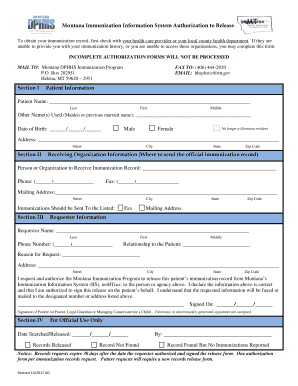
- In Section I, provide your patient information. Fill in your last name, first name, and middle name. Include any other names you have used, such as a maiden or previously married name. Enter your date of birth, and select your gender by marking the appropriate box. If you are no longer a resident of Montana, ensure to check that box.
- Continue in Section I by filling out your complete address, including street, city, state, and zip code. This is crucial for the return of your immunization record.
- In Section II, provide the receiving organization information. Clearly enter the name of the person or organization that will receive the immunization record. Additionally, fill in their phone number and fax number if applicable, along with the mailing address where the record should be sent.
- Move to Section III, where you enter the requestor information. This section requires the name and contact details of the person requesting the information, along with their relationship to the patient and the reason for the request.
- Reconfirm your address in Section III by filling in the street, city, state, and zip code fields. Ensure these details are consistent with the patient’s information.
- Sign the document where indicated in Section III to authorize the release of immunization records. Ensure that you have the authority to sign on behalf of the patient. Remember, electronic or digitally generated signatures are not accepted.
- Once the form is complete, review all sections for accuracy before submitting it. You can then save your changes, download the form, print it for mailing, or share it electronically with the required parties.
Ensure you complete your authorization form online today for timely access to your immunization records.
Related links form
The Washington State Immunization Information System (IIS) (PDF) is a lifetime registry that keeps track of immunization records for people of all ages. The system is a secure, web-based tool for healthcare providers and schools. The IIS connects people who receive, administer, record, and order vaccines in Washington.