Loading
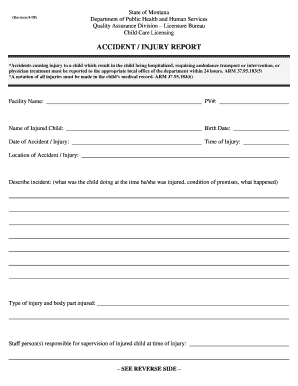
Get Mt Dphhs Accident/injury Report 2008-2026
How it works
-

Open form follow the instructions
-

Easily sign the form with your finger
-

Send filled & signed form or save
How to fill out the MT DPHHS Accident/Injury Report online
Filling out the MT DPHHS Accident/Injury Report online is an essential process for documenting any injury incidents involving children in a childcare setting. This guide will provide you with step-by-step instructions to ensure accurate and timely reporting.
Follow the steps to complete the report effectively
- Click ‘Get Form’ button to access the document and open it in the designated online editor.
- Begin by entering the facility name where the incident occurred. This step ensures accurate tracking and accountability.
- Fill in the PV# section, which is the provider number assigned to your facility. This helps in identifying your location.
- Provide the name of the injured child, including their birth date to verify their identity and age.
- In the 'Date of Accident / Injury' field, clearly state the date when the incident took place.
- Record the 'Time of Injury', specifying the exact time when the injury occurred.
- Indicate the 'Location of Accident / Injury' where the incident happened to clarify the context of the injury.
- In the 'Describe incident' section, provide a detailed account of what the child was doing at the moment of injury, the condition of the premises, and a narrative of what happened.
- Document the 'Type of injury and body part injured', ensuring to be specific about the nature of the injury.
- List the staff person(s) responsible for supervising the injured child at the time of the incident.
- Include witnesses to the accident/injury by entering their names in the provided fields. Capture as many witnesses as possible for a complete report.
- Describe what first aid actions were taken, including the date and time first aid was provided, and the name of the staff person who administered it.
- Document where the child was taken after the accident, how they were transported, and who was responsible for the transport.
- Note what medical treatment, if any, was administered to the child after the incident.
- Record the method of parent notification, along with the date and time when the parents were informed.
- Finally, obtain necessary signatures from the parent and staff/witnesses, and input the corresponding dates.
- Once all fields are filled, save changes to your report file, and consider downloading, printing, or sharing the completed form as required.
Complete your documentation accurately and promptly by filling out the MT DPHHS Accident/Injury Report online today.
Incident Report Sample Walkthrough: A Step-by-Step Guide Step 1: Provide Fundamental Information. ... Step 2: Take Note of Any Damages and Injuries. ... Step 3: Identify Affected Individual(s) ... Step 4: Identify Witnesses and Take Their Statements. ... Step 5: Take Action. ... Step 6: Close Your Report.