Get Uk Nhs England Third Party Ceff Compliance Statement 2019-2026
How it works
-

Open form follow the instructions
-

Easily sign the form with your finger
-

Send filled & signed form or save
How to fill out the UK NHS England Third Party CEfF Compliance Statement online
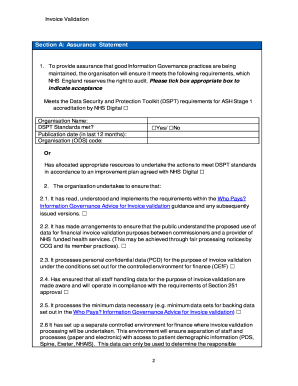
The UK NHS England Third Party CEfF Compliance Statement is essential for organizations contracted to provide CEfF services, ensuring compliance with the requirements of the Controlled Environment for Finance. This guide offers clear, step-by-step instructions to help users fill out the Compliance Statement online effectively.
Follow the steps to complete the Compliance Statement correctly.
- Press the ‘Get Form’ button to obtain the Compliance Statement and open it for editing.
- In Section A, provide assurance by ticking the appropriate boxes to indicate whether your organization meets the Data Security and Protection Toolkit requirements for ASH Stage 1 accreditation by NHS Digital. Enter the organization name, publication date, and organization code.
- Continue filling out Section A by agreeing to the listed conditions 2.1 to 2.13. Each box needs to be ticked to confirm compliance and understanding of the requirements set forth in the guidance.
- In Section B, confirm if a data processing agreement/SLA is in place between your organization and each Clinical Commissioning Group (CCG) by ticking the 'Yes' or 'No' boxes.
- In Section C, list the CCGs for which the invoice validation service is being undertaken, including the organization code and CEfF email addresses. Gather and input the names and email addresses of each CCG's Authorising Officer to ensure proper authorization.
- Section D pertains to any change of circumstances. Indicate if this completion is the result of a merge or a change of supplier by ticking 'Yes' or 'No'. If applicable, list the merged organizations.
- In Section E, maintain a local staff list of individuals requiring access to GP registration data and other patient demographic information. Provide the roles and systems they will access for validation purposes.
- In Section F, enter the details for authorized signatories, including names and signatures (electronically with email confirmations when required) and the date of signing.
- In Section G, nominate key contacts responsible for any CEfF queries by providing their information.
- After completing all sections, review the document for accuracy. You can then save your changes, download, print, or share the completed Compliance Statement with the relevant contacts as specified.
Complete your UK NHS England Third Party CEfF Compliance Statement online today to ensure your organization meets the necessary compliance requirements.
nominated Controlled Environment for Finance (CEfF). A bill for the provision of health care and treatment provided to a patient and submitted by the provider of those services to the CCG responsible for that patient. Consent is just one of the Legal Bases used for processing data.