Loading
Form preview
  • US Legal Forms
  • Form Library
  • Foreign Forms
  • Foreign New Zealand Other Forms
  • Nz Putauaki Trust Registration Form

Get Nz Putauaki Trust Registration Form

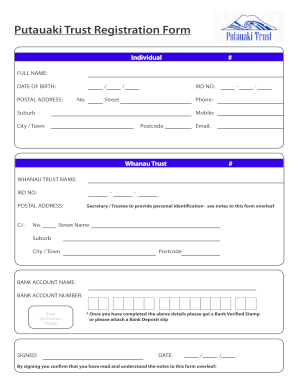
Putauaki Trust Registration Form Individual # FULL NAME: DATE OF BIRTH: / / POSTAL ADDRESS: No. Street Suburb City / Town Postcode IRD NO: Mobile: Email: Whanau Trust Phone: # WHANAU TRUST NAME: IRD.

How it works

  1. Open form

    Open form follow the instructions

  2. Easily sign form

    Easily sign the form with your finger

  3. Share form

    Send filled & signed form or save

How to fill out the NZ Putauaki Trust Registration Form online

Filling out the NZ Putauaki Trust Registration Form online is a crucial step for individuals and family trusts to manage and register their information with Putauaki Trust. This guide provides clear and detailed instructions to help users navigate the form accurately and efficiently.

Follow the steps to complete the registration form smoothly.

  1. Click the 'Get Form' button to obtain the NZ Putauaki Trust Registration Form, making it accessible for completion in your preferred format.
  2. Provide your full name in the designated field, ensuring that your name is spelled correctly as it appears on your identification documents.
  3. Enter your date of birth in the specified format, using the day, month, and year as required.
  4. Fill in your postal address, including the street number, street name, suburb, city or town, and postcode, to ensure accurate correspondence.
  5. Enter your IRD number in the designated field to facilitate tax identification.
  6. Provide your phone and mobile numbers, as well as your email address for communication purposes.
  7. For whanau trusts, specify the whanau trust name and IRD number in the corresponding sections.
  8. Complete the postal address for the secretary or trustee, including the details as indicated previously.
  9. Fill in the bank account name and number for verification purposes, ensuring the accuracy of this information.
  10. Obtain a bank verification stamp or attach a bank deposit slip as proof for your banking details.
  11. Sign and date the form to confirm that you have read and understood the notes provided.
  12. Once you have completed all the relevant sections, review the form for accuracy before submitting it online.
  13. You can save your changes, download, print, or share the completed form as needed.

Start filling out the NZ Putauaki Trust Registration Form online today to ensure your registration is processed efficiently.

Get form

Experience a faster way to fill out and sign forms on the web. Access the most extensive library of templates available.
Get form

Related content

Small Business Administration
We support America's small businesses. The SBA connects entrepreneurs with lenders and...
Learn more
Ecological restoration of New Zealand islands...
measures that have seen only limited application in New Zealand so far will undoubtedly...
Learn more
Putauaki - Wikipedia
Putauaki is a dacite volcanic cone in the Bay of Plenty Region of New Zealand. Located 50...
Learn more

Related links form

FL JHBI Dizziness Handicap Inventory (DHI) 2011 FL Agency For Health Care Administration Bed Change Request Form 2018 MA Final Contractor Construction Control Affidavit - Town Of Ashland 2020 MA Final Contractor Construction Control Affidavit - Town Of Ashland 2010

Questions & Answers

Get answers to your most pressing questions about US Legal Forms API.

Contact support

Beneficiaries left out may feel aggrieved. Loss of control. The trustees can ignore the settlor's wishes. Trusts can be costly to set up and run. As with all trusts a discretionary trust needs to be properly administered.

A discretionary trust addresses the relationship in which one person legally owns an asset for the benefit of another person or set of persons. The person who legally owns the asset is called the trustee, and the person or persons for whose benefit the asset is held is called a beneficiary.

A discretionary trust gives trustees the power to decide how much beneficiaries get from a trust and when they get it. All capital and income is distributed completely at their discretion. This means there's more flexibility and assets can be protected if circumstances change for any reason.

An Non-discretionary provides that the trustees must pay trust income upon request to the beneficiaries, they are not in a position where they can refuse. With a Discretionary trusts the trustees have the option whether to make payment to the beneficiaries or not.

Discretionary trust These are where the trustees have discretion to make decisions about how to use the capital and income of the trust. There is no specific exclusion from registration for discretionary trusts. In general, discretionary trusts should register on TRS.

If you are a trustee, you will need to consider carefully if you are required to register the trust. The recent changes – which came into effect from 6 October 2020 – mean that all express trusts, even if they are not taxable will need to be registered unless they are excluded.

Get This Form Now!

Use professional pre-built templates to fill in and sign documents online faster. Get access to thousands of forms.
Get form
If you believe that this page should be taken down, please follow our DMCA take down processhere.
Get NZ Putauaki Trust Registration Form
Get form
  • Adoption
  • Bankruptcy
  • Contractors
  • Divorce
  • Home Sales
  • Employment
  • Identity Theft
  • Incorporation
  • Landlord Tenant
  • Living Trust
  • Name Change
  • Personal Planning
  • Small Business
  • Wills & Estates
  • Packages A-Z
  • Affidavits
  • Bankruptcy
  • Bill of Sale
  • Corporate - LLC
  • Divorce
  • Employment
  • Identity Theft
  • Internet Technology
  • Landlord Tenant
  • Living Wills
  • Name Change
  • Power of Attorney
  • Real Estate
  • Small Estates
  • Wills
  • All Forms
  • Forms A-Z
  • Form Library
  • Legal Hub
  • About Us
  • Help Portal
  • Legal Resources
  • Blog
  • Affiliates
  • Contact Us
  • Delete My Account
  • Site Map
  • Industries
  • Forms in Spanish
  • Localized Forms
  • State-specific Forms
  • Forms Kit
  • Real Estate Handbook
  • All Guides
  • Notarize
  • Incorporation services
  • For Consumers
  • For Small Business
  • For Attorneys
  • USLegal
  • FormsPass
  • pdfFiller
  • signNow
  • altaFlow
  • DocHub
  • Instapage
Form Packages
  • Adoption
  • Bankruptcy
  • Contractors
  • Divorce
  • Home Sales
  • Employment
  • Identity Theft
  • Incorporation
  • Landlord Tenant
  • Living Trust
  • Name Change
  • Personal Planning
  • Small Business
  • Wills & Estates
  • Packages A-Z
Form Categories
  • Affidavits
  • Bankruptcy
  • Bill of Sale
  • Corporate - LLC
  • Divorce
  • Employment
  • Identity Theft
  • Internet Technology
  • Landlord Tenant
  • Living Wills
  • Name Change
  • Power of Attorney
  • Real Estate
  • Small Estates
  • Wills
  • All Forms
  • Forms A-Z
  • Form Library
Customer Service
  • Legal Hub
  • About Us
  • Help Portal
  • Legal Resources
  • Blog
  • Affiliates
  • Contact Us
  • Delete My Account
  • Site Map
  • Industries
  • Forms in Spanish
  • Localized Forms
  • State-specific Forms
  • Forms Kit
Legal Guides
  • Real Estate Handbook
  • All Guides
Prepared for you
  • Notarize
  • Incorporation services
Our Customers
  • For Consumers
  • For Small Business
  • For Attorneys
Our Sites
  • USLegal
  • FormsPass
  • pdfFiller
  • signNow
  • altaFlow
  • DocHub
  • Instapage
Social Media
Call us now toll free:
+1 833 426 79 33
As seen in:
© Copyright 1999-2026 airSlate Legal Forms, Inc. 3720 Flowood Dr, Flowood, Mississippi 39232
  • Your Privacy Choices
  • Terms of Service
  • Privacy Notice
  • Content Takedown Policy
  • Bug Bounty Program