Loading
Get Ie Allianz Care Frm-pcf-en 2019-2025
How it works
-

Open form follow the instructions
-

Easily sign the form with your finger
-

Send filled & signed form or save
How to fill out the IE Allianz Care FRM-PCF-EN online
Completing the IE Allianz Care FRM-PCF-EN form online is a straightforward process that ensures efficient submission of your medical claims. This guide provides clear, step-by-step instructions to help you fill out each section correctly.
Follow the steps to complete your medical provider claim form online.
- Click ‘Get Form’ button to initiate the process and open the form in the online editor.
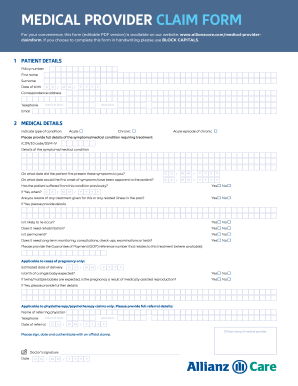
- Enter the patient details, including policy number, first name, surname, date of birth, correspondence address, telephone number and email address. Ensure that all details are completed accurately.
- Proceed to the medical details section. Indicate the type of condition (acute, chronic, or acute episode of chronic) and provide full details about the symptoms or medical condition requiring treatment, including ICD9/10 code/DSM-IV where applicable.
- Specify the dates related to the symptoms: when they first presented and when the first onset was apparent. Also, indicate whether the patient has suffered from this condition previously and if it may reoccur.
- Answer questions regarding the need for rehabilitation, whether the condition is permanent, and if long-term monitoring or consultations are required.
- If applicable, provide information regarding pregnancy or the expected birth of multiple babies. Include details such as the estimated date of delivery and GPA reference number if relevant.
- Include referral details if this claim relates to physiotherapy or psychotherapy, such as the name of the referring physician, their telephone number, and the date of referral.
- Ensure both the medical provider and patient sections are signed and dated appropriately. Include any required official stamps.
- Review the document for completeness. Confirm that all original receipts, invoices, and prescriptions are attached. Make sure that all required declarations are signed.
- Once all information is complete, save any changes made, and download or print the form. Prepare to send the completed document to the specified address.
Start filling out your IE Allianz Care FRM-PCF-EN form online today for a seamless claims process.
Related links form
Virginia Oyster Gardening Guide. Virginia Oyster Gardening Guide - Deq Virginia
State Water Control Board Enforcement Action Special Order By Consent Issued To Aquasource Utility
Guidance For Determining Eligibility Of Sites For The Voluntary Remediation Program - Deq Virginia
The Virginia Department Of Environmental Quality - Deq Virginia
Claim via Allianz MyHealth app Download the app or login to the portal (If you have not done so already). Register for an account. Be sure to have your policy number ready. Select 'Submit claim'. Upload photos of your invoices and receipts.
Industry-leading security and compliance
US Legal Forms protects your data by complying with industry-specific security standards.
-
In businnes since 199725+ years providing professional legal documents.
-
Accredited businessGuarantees that a business meets BBB accreditation standards in the US and Canada.
-
Secured by BraintreeValidated Level 1 PCI DSS compliant payment gateway that accepts most major credit and debit card brands from across the globe.