Loading
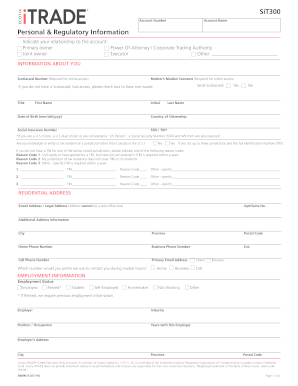
Get Canada Scotia Itrade 8989015 2019-2026
How it works
-

Open form follow the instructions
-

Easily sign the form with your finger
-

Send filled & signed form or save
How to fill out the Canada Scotia ITRADE 8989015 online
Filling out the Canada Scotia ITRADE 8989015 form online is an essential step for users looking to open an account for trading purposes. This guide provides clear, step-by-step instructions to ensure that you complete the form accurately and efficiently.
Follow the steps to successfully complete your application.
- Press the ‘Get Form’ button to obtain the online form and open it in your browser.
- In the 'Account Number' field, enter your unique account number if you have one. If not, leave this section blank.
- Fill in the 'Account Name' to identify the ownership of the account.
- Under 'Personal & Regulatory Information', check your relationship to the account by selecting one of the options: Primary owner, Joint owner, Power of Attorney, Executor, or Other.
- Provide your Scotiacard number and mother's maiden surname in the required fields for online access.
- Complete your personal information, including your title, first name, initial, last name, date of birth, country of citizenship, and social insurance number. Ensure that the information is accurate to prevent issues with your application.
- If applicable, indicate if you are a tax resident in a jurisdiction other than Canada or the U.S. If yes, provide the necessary details and Tax Identification Numbers.
- In the 'Residential Address' section, enter the complete legal address (no P.O. boxes), including street address, apartment/suite number, city, province, and postal code. Provide contact numbers and an email address for correspondence.
- Fill out the 'Employment Information' section, indicating your employment status and any relevant details about your employer and your role. If retired, include prior employment information.
- Disclose your annual income range and provide information about your net worth, including net liquid assets and fixed assets.
- Specify the intended use or purpose of your account by selecting from the provided options, such as short-term investment or income generation.
- Assess your experience in investments by selecting your knowledge level for different financial instruments listed.
- Answer the questions related to insider trading and your relationships with public companies, providing additional details as required.
- Complete the identification requirements by selecting a type of identification document and providing the document number. Include a photo ID when you submit your application.
- Finally, review all the entered information for accuracy, then sign and date the form. After completion, you can save changes, download, print, or share the filled-out form as necessary.
Start completing your Canada Scotia ITRADE 8989015 form online today for a seamless account setup experience.
16-digit Scotia card number or 8-10 digits Scotia iTRADE account number.