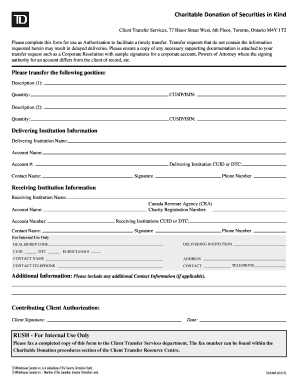
CLEAR BUTTONCharitable Donation of Securities in Kind Client Transfer Services, 77 Bloor Street West, 6th Floor, Toronto, Ontario M4Y 1T2Please complete this form for use as Authorization to facilitate.
Loading
Open form follow the instructions
Easily sign the form with your finger
Send filled & signed form or save
How to fill out the Canada TD Bank 524386 online
This guide provides step-by-step instructions for completing the Canada TD Bank 524386 form online. Whether you are making a charitable donation of securities or transferring your account, this comprehensive guide will help you navigate the process with ease.
Follow the steps to complete your form accurately
- Click ‘Get Form’ button to access the Canada TD Bank 524386 form online.
- Begin by entering the details for the securities you wish to transfer. Fill in the Description, Quantity, and CUSIP/ISIN for each position you want to donate. Ensure the descriptions are accurate to avoid delays.
- Proceed to the Delivering Institution Information section. Enter the Delivering Institution Name, Account Name, Account Number, CUID or DTC, and the contact person's name. This information is critical for the processing of your transfer.
- In the Receiving Institution Information section, provide the name of the Canada Revenue Agency, along with the Charity Registration Number, Account Name, CUID or DTC, Account Number, contact name, and their phone number.
- Sign the form in the Signature field and include your phone number. This step confirms your authorization for the transfer.
- Complete the Contributing Client Authorization section by signing and dating the form. This indicates your agreement with the transfer process.
- After filling out all the required fields, review the form for accuracy. Save your changes, then download, print, or share the completed form as necessary.
Complete your documents online today to facilitate your securities transfer smoothly.
Experience a faster way to fill out and sign forms on the web. Access the most extensive library of templates available.
Related content
... Times, Serif; margin: 0; color: #0D0D0D">...
Edited by T. D. Price and A. B. Gebauer, pp. 39–94. Santa Fe: School of American...
Get answers to your most pressing questions about US Legal Forms API.
How long does it take to redeem TD Mutual Funds?
The bank account linked to your mutual fund account will be credited or debited usually the next business day (not guaranteed) and within three business days.
How do I sell my TD Mutual Fund?
In EasyWeb, from the My Accounts > Investments screen, click on Redeem Mutual Funds from the left navigation menu. Select the account from which you would like to redeem mutual funds and follow the onscreen instructions.
Can I buy mutual funds through TD Ameritrade?
What investments are available? Through your TD Ameritrade account you can select from publicly traded stocks, ETFs, fixed income securities and a broad range of mutual funds, including No Transaction Fee (NTF) mutual funds.
Can I purchase mutual fund online?
You can invest directly in a Mutual Fund either offline or online, if your KYC is complete. If you are uncomfortable transacting online, you can invest in a fund by visiting its nearest branch. Online is the most convenient way to invest directly in Mutual Fund schemes and you get to save on commissions as well.
How to buy TD E Series mutual funds?
Go to a local TD branch and ask to open a mutual fund account. Take your Social Insurance Number (SIN) card and another piece of government ID along. The financial advisor or representative will ask you a series of questions to complete your investor profile and determine your risk tolerance.
How do I buy mutual funds in TD?
How can we help you? Log into TD app. Select a mutual fund account. Details of the mutual fund account will display. Tap the Purchase Mutual Funds button. Fill out the Purchase form. Tap Preview Purchase. Review your details and tap Purchase to proceed.
How do I contact TD Canada Mutual Funds?
We offer you three easy ways to open a TD Mutual Funds RSP Account: download an application and return it by mail; speak to a TD Investment Services Mutual Funds Representative by phone through EasyLine telephone banking 1-866-222-3456; or in person at your local TD Canada Trust branch.
How to purchase TD Mutual Funds online?
Start investing in Mutual Funds with TD Direct Investing Open an account. Select the TD Direct Investing account you want to open online or book an appointment. Fund your account. ... Start investing toward your goals.
Use professional pre-built templates to fill in and sign documents online faster. Get access to thousands of forms.
If you believe that this page should be taken down, please follow our DMCA take down process here.