Loading
Get Au Ausgrid Annexure R - Asp/3 2017-2026
How it works
-

Open form follow the instructions
-

Easily sign the form with your finger
-

Send filled & signed form or save
How to fill out the AU Ausgrid Annexure R - ASP/3 online
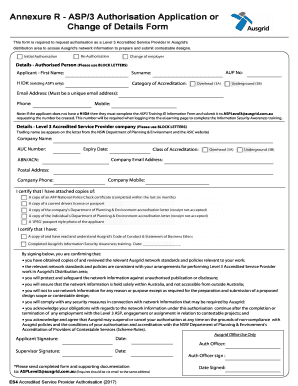
The AU Ausgrid Annexure R - ASP/3 is essential for requesting authorisation as a Level 3 Accredited Service Provider. This guide will provide clear and supportive instructions on how to accurately complete the form online.
Follow the steps to fill out the AU Ausgrid Annexure R - ASP/3 online successfully.
- Click the ‘Get Form’ button to access the AU Ausgrid Annexure R - ASP/3. This will open the document in your selected editor for completion.
- Begin by filling out the section titled 'Details - Authorised Person.' Use block letters to input your AUP number, first name, surname, existing H ID# (if applicable), category of accreditation (choose from overhead or underground), email address (ensure it is unique), phone number, and mobile number.
- In the next section labeled 'Details - Level 3 Accredited Service Provider company,' similarly use block letters. Enter the trading name as it appears on the official documents, company name, AUC number, expiry date, ABN or ACN, and class of accreditation (overhead or underground). Fill in the company email address, postal address, company phone number, and company mobile.
- Ensure to attach the required documents listed in the form. These include a national police check certificate, a current driver's license or passport, the company's Department of Planning & Environment accreditation letter, the individual's accreditation letter, and a JPEG passport-style photo of the applicant.
- Review the certification statements in the form. Confirm you have read and understand Ausgrid's Code of Conduct and Statement of Business Ethics, and have completed the Information Security Awareness training by entering the date.
- Sign the form where indicated for the applicant's signature and date. Additionally, provide space for the supervisor's signature and date.
- Once you have completed all sections and attached the necessary supporting documents, ensure everything is accurate. You can then save changes, download, or print the form.
- Finally, submit the completed form and all attachments to ASPLevel3@ausgrid.com.au for processing.
Take the next step—complete your AU Ausgrid Annexure R - ASP/3 online today.