Loading
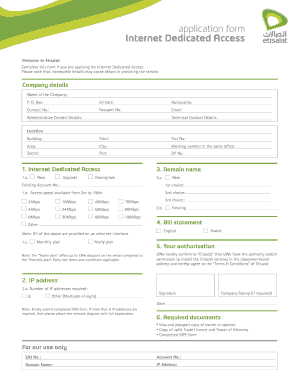
Get Ae Etisalat Internet Dedicated Access Plus Application Form
How it works
-

Open form follow the instructions
-

Easily sign the form with your finger
-

Send filled & signed form or save
How to fill out the AE Etisalat Internet Dedicated Access Plus Application Form online
Welcome to the guide on completing the AE Etisalat Internet Dedicated Access Plus Application Form. This comprehensive resource will assist you in successfully filling out the form online, ensuring that all necessary details are accurately provided to avoid delays in service.
Follow the steps to efficiently complete your application form.
- Click ‘Get Form’ button to obtain the form and open it in the editor.
- Fill in the company details section by providing the name of the company, P.O. Box, emirate, nationality, contact number, passport number, and email address.
- Complete the administrative and technical contact details by entering the relevant information for both contacts.
- In the location section, provide details such as the building name, floor number, flat number, area, city, working number in the same office, sector, plot number, and DP number.
- Select the type of Internet Dedicated Access you are applying for by marking either 'New', 'Upgrade', or 'Downgrade' in the respective section.
- Choose your access speed from the available options ranging from 2Mbps to 100Mbps. You can select up to three choices.
- Indicate whether you prefer a monthly or yearly plan. Note that the yearly plan offers a discount.
- Select your bill statement preference by choosing either English or Arabic.
- Confirm your authorization by acknowledging that you have the authority to request installation of Etisalat services at the specified address, and agree to the terms and conditions.
- Specify the number of IP addresses required, keeping in mind that if more than 8 are needed, you must attach a network diagram with an explanation.
- Add your signature, company stamp (if required), and date to the form.
- Ensure you include all required documents, such as a visa and passport copy of the owner or sponsor, a copy of the valid trade license and power of attorney, and the completed RIPE form.
- Once you have completed filling out the form, save your changes and proceed to download, print, or share the form as needed.
Complete your AE Etisalat Internet Dedicated Access Plus Application Form online today to ensure swift processing of your request.
By dialling *170*1# or *101# By texting “DATA” to 1010 – AED 0.30/SMS (5% VAT excluded)...Other ways to get: Via the My Etisalat UAE app. By dialling *170# or *101# By texting "SD" to 1010.