Loading
Get Oh Application For Approval To Serve Three-year-old Children 2017
How it works
-

Open form follow the instructions
-

Easily sign the form with your finger
-

Send filled & signed form or save
How to fill out the OH Application For Approval To Serve Three-Year-Old Children online
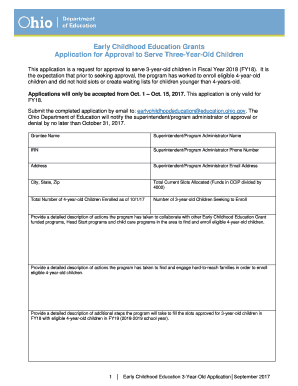
This guide provides a clear and supportive approach to completing the OH Application For Approval To Serve Three-Year-Old Children. By following these steps, users can ensure they are accurately filling out the necessary information to seek approval for serving three-year-old children in their early childhood education programs.
Follow the steps to complete the application efficiently.
- Click the ‘Get Form’ button to access the application and open it for editing.
- Fill in the grantee name, superintendent or program administrator name, and the IRN (Identification Registration Number). This basic information is essential for proper identification of your application.
- Enter the phone number and email address of the superintendent or program administrator. Providing accurate contact information ensures effective communication regarding your application status.
- Complete the address fields, which include the city, state, and zip code. This information is important for geographical identification.
- Record the total current slots allocated by dividing funds in the CCIP by 4000. This figure represents your program's financial provisioning for slots.
- Indicate the total number of four-year-old children enrolled as of October 1, 2017. This data illustrates the current enrollment situation.
- Specify the number of three-year-old children you are seeking to enroll. This is a critical part of your request for approval.
- Provide detailed descriptions for the required actions, including collaboration with other early childhood education programs, engagement with hard-to-reach families, and steps for filling the approved slots for three-year-old children. These narratives help demonstrate your program's commitment and strategy.
- Review and sign the application where indicated, ensuring that all information is accurate and complete before submission. Include your name, title, signature, date, phone number, and email address at the bottom of the application.
- After completing the form, you can save your changes, download the application for your records, print it out, or share it with relevant parties.
Begin filling out the application online to ensure your program can serve three-year-old children effectively.
Get form
Experience a faster way to fill out and sign forms on the web. Access the most extensive library of templates available.
Related links form
Get This Form Now!
Use professional pre-built templates to fill in and sign documents online faster. Get access to thousands of forms.