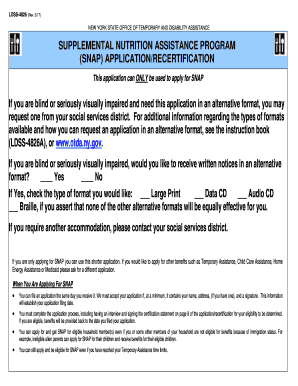
LDSS4826(Rev. 3/17)NEW YORK STATE OFFICE OF TEMPORARY AND DISABILITY ASSISTANCESUPPLEMENTAL NUTRITION ASSISTANCE PROGRAM (SNAP) APPLICATION/RECERTIFICATION This application can ONLY be used to apply.
Open form follow the instructions
Easily sign the form with your finger
Send filled & signed form or save
How to fill out the NY LDSS-4826 online
The NY LDSS-4826 is a crucial form for individuals seeking to apply for or recertify their benefits under the Supplemental Nutrition Assistance Program (SNAP) in New York State. This guide provides clear, step-by-step instructions to help you fill out the form online accurately and efficiently.
Follow the steps to complete your application today.
- Click ‘Get Form’ button to obtain the form and open it in the editor.
- Begin the application by filling in your legal name and contact information, including your telephone number and residence address, ensuring that all details are accurate and current.
- Select whether you want to receive communications in English, Spanish, or both. This is important for ensuring you receive notices in your preferred language.
- List everyone in your household, starting with yourself. Include first names, last names, Social Security numbers, dates of birth, marital status, gender, and whether they are applying for benefits.
- Provide detailed information regarding income for all household members. Include the source of income, monthly hours worked, frequency of payment, and gross amounts received.
- If applicable, indicate dependent care costs, and describe any recent job changes within the past 30 days that may affect your application.
- Disclose all financial resources, including bank account balances, vehicles owned, and other relevant assets that might impact your eligibility.
- Fill in educational details for each household member aged 16 and older, marking the highest level of education completed and noting language proficiency.
- Check applicable living arrangements and expenses. Include details regarding rent, mortgage payments, utilities, and other financial responsibilities.
- Answer questions regarding any legal issues or past violations related to SNAP. Ensure transparency as this information is crucial for determining eligibility.
- Review your application for accuracy, and complete the certification statement at the end by signing and dating the form.
- After completing the form, save your changes. You may also download, print, or share the form as needed.
Complete your NY LDSS-4826 application online now to access your SNAP benefits.
Experience a faster way to fill out and sign forms on the web. Access the most extensive library of templates available.
Related content
If you live in New York City and you are not also applying for Temporary Assistance, you...
Get answers to your most pressing questions about US Legal Forms API.
How to fill out a SNAP recertification form?
Filling out a SNAP recertification form involves providing updated details about your household income, expenses, and changes since your last certification. Utilize the NY LDSS-4826 as a reference to ensure you include all necessary information. Once completed, submit it online or in person.
How often do you have to recertify for food stamps in California?
In California, you typically need to recertify for food stamps every 12 months. This process involves submitting updated financial information and documentation. While this refers to California, if you’re in NY, the NY LDSS-4826 will guide your recertification schedule.
Where do I send my NY SNAP application?
You should send your NY SNAP application to your local SNAP office or submit it online through the NY State website. Ensuring that all required documents, as highlighted in NY LDSS-4826, accompany your application can aid in quicker approval.
How does SNAP redetermination work?
SNAP redetermination ensures that recipients still meet eligibility requirements. Typically, you must recertify every 12 months by submitting required documentation and completing an interview. The NY LDSS-4826 helps outline necessary steps for this process.
What documentation do you need for SNAP NY?
To apply for SNAP in NY, you need various documents including proof of identity, income verification, and household expenses. Gathering these documents will make the application process smoother. For additional assistance, refer to the NY LDSS-4826.
What is the highest income to qualify for SNAP in NY?
The highest income limit for SNAP in NY varies by household size and composition. You typically need to stay within 130% of the federal poverty level. The NY LDSS-4826 form provides detailed guidelines to help you assess your eligibility.
Does NY SNAP check your bank account?
Yes, NY SNAP may review bank statements to verify your financial eligibility. This evaluation helps ensure that resources are allocated fairly. When filling out the NY LDSS-4826, be prepared to share your bank information for accurate processing.
How to fill out SNAP recertification?
To fill out SNAP recertification, you base your information on current income, expenses, and household members. Make sure to refer to the NY LDSS-4826 for specific guidelines and required documentation. Submit your completed form either online or at your local office.
Does NYC SNAP check your bank account?
Yes, NYC SNAP may check your bank account as part of the eligibility process. They assess your financial resources to ensure you meet the program requirements. Always be transparent about your financial situation when completing the NY LDSS-4826 form.
How long does a SNAP recertification interview take?
A SNAP recertification interview usually takes about 30 to 60 minutes. During this time, you will discuss your current financial situation and any changes since your last application. Preparation using the NY LDSS-4826 form can streamline this process.
Use professional pre-built templates to fill in and sign documents online faster. Get access to thousands of forms.
If you believe that this page should be taken down, please follow our DMCA take down process here.
This form is available in several versions. Select the version you need from the drop-down list below.