Loading
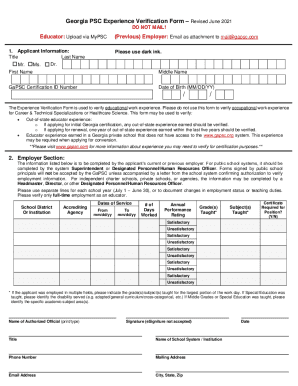
Get Ga Gapsc Experience Verification Form 2021-2026
How it works
-

Open form follow the instructions
-

Easily sign the form with your finger
-

Send filled & signed form or save
How to fill out the GA GAPSC Experience Verification Form online
Filling out the GA GAPSC Experience Verification Form online is an essential step for educators seeking to verify their work experience for certification purposes in Georgia. This guide will provide you with clear instructions to navigate each section of the form effectively.
Follow the steps to complete the form accurately.
- Click ‘Get Form’ button to access the form and open it in the designated editor.
- Begin by filling in the applicant information section. This includes entering your title, last name, first name, middle name, GaPSC certification ID number, and date of birth. Be sure to use dark ink as specified.
- Proceed to the employer section, where your current or previous employer must provide the required information. Ensure only full-time employment as an educator is verified. This section should be completed by the system Superintendent or designated personnel.
- Fill in the school district or institution name, the accrediting agency, and the dates of service. Use separate lines for each school year or to document any changes regarding employment status or teaching duties.
- Indicate the number of days worked, and include the annual performance rating for each year taught. Ratings should show whether the performance was satisfactory or unsatisfactory.
- Detail the grades and subjects taught during your employment. If applicable, specify the disability served in special education positions and the specific academic subject areas if middle grades or special education was taught.
- The employer must print or type their name, sign the form (eSignature is not acceptable), include their title, the name of the school system or institution, and provide contact information. Ensure all details are accurate and complete.
- After reviewing all entries for accuracy, save your changes. You will then have the option to download, print, or share the form digitally as required.
Complete your GA GAPSC Experience Verification Form online today for a smooth certification process.