Loading
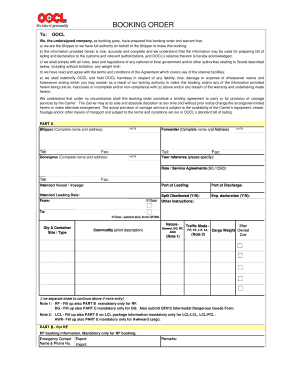
Get Booking Form Oocl
How it works
-

Open form follow the instructions
-

Easily sign the form with your finger
-

Send filled & signed form or save
How to fill out the Booking Form Oocl online
Filling out the Booking Form Oocl online can seem daunting, but this guide will provide you with clear and concise steps to complete it accurately. Each section of the form is essential for ensuring the smooth processing of your booking.
Follow the steps to successfully complete the Booking Form Oocl online.
- Press the ‘Get Form’ button to retrieve the booking form and open it in your document editor.
- Begin with Part A, where you will need to fill out the shipper's complete name and address. Make sure to include the telephone number and VAT number as required.
- Next, provide the forwarder's complete name and address, along with their telephone and VAT numbers. Include your reference and fax number in the appropriate fields.
- Input the consignee's complete name and address, ensuring all required contact information is included.
- For the intended vessel and voyage, clearly specify the intended loading date, port of loading, and port of discharge.
- Indicate whether split is disallowed by choosing 'Y' or 'N' and specify if an export declaration is needed.
- In the 'Qty & Container' section, provide details about the size/type of the containers, a short description of the commodities, and any relevant traffic mode information.
- If your booking involves refrigerated or dangerous goods, complete Parts B and C as necessary, including emergency contact information for these specific cargoes.
- Complete any additional sections required for LCL or awkward cargo, if applicable, filling out details such as quantity, type of package, and cargo weight.
- After completing the form, review all entries for accuracy. Once satisfied, you can save changes, download, print, or share the completed form as needed.
Get started on your Booking Form Oocl online today for a seamless booking experience.
For account issues, please email EBILLSETUP@oocl.com for assistance. On-line rail billing is available 24/7, and rail billing status is available on-line.