Loading
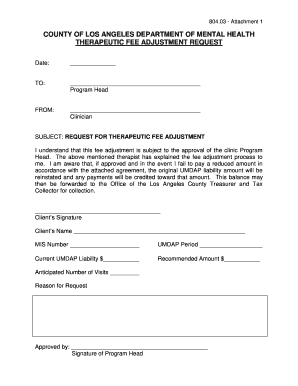
Get Therapeutic Fee Adjustment Request
How it works
-

Open form follow the instructions
-

Easily sign the form with your finger
-

Send filled & signed form or save
How to fill out the THERAPEUTIC FEE ADJUSTMENT REQUEST online
Navigating the therapeutic fee adjustment process can be straightforward with the right guidance. This guide will help you understand how to fill out the Therapeutic Fee Adjustment Request form online, ensuring that all necessary information is accurately provided.
Follow the steps to complete your request seamlessly.
- Press the ‘Get Form’ button to access the form and open it in your designated editor.
- Begin by entering the date at the top of the form. This will indicate when the request is submitted.
- In the 'TO:' field, write the name of the program head to whom the request is being addressed.
- Under the 'FROM:' section, fill in your name as the clinician submitting the request.
- In the 'SUBJECT' line, repeat the title 'REQUEST FOR THERAPEUTIC FEE ADJUSTMENT' to ensure clarity.
- Acknowledge the fee adjustment process by signing in the designated section, confirming that you understand the terms.
- Next, provide your full name under 'Client’s Name' and enter the relevant MIS number in the space provided.
- Fill in the UMDAP Period to specify the duration for which the fee adjustment is requested.
- Detail the 'Current UMDAP Liability' amount in the corresponding box.
- Indicate the 'Recommended Amount' you are requesting for the fee adjustment.
- Enter the 'Anticipated Number of Visits' to help outline the expected therapy sessions under the adjustment.
- Lastly, include the 'Reason for Request' to provide context for the adjustment being sought.
- The program head will finalize the form by signing in the 'Approved by' section to indicate their approval.
- Once all fields are filled, you may save changes, download the document, print it, or share it as needed.
Start filling out your Therapeutic Fee Adjustment Request online today for a smooth submission process.