Loading
Get Icpo Template Word
How it works
-

Open form follow the instructions
-

Easily sign the form with your finger
-

Send filled & signed form or save
How to fill out the Icpo Template Word online
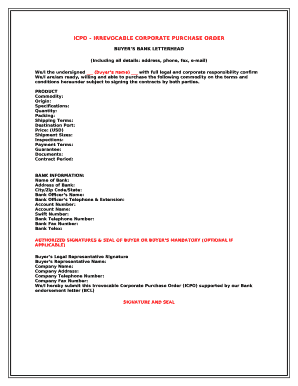
Filling out the Icpo Template is an essential task for users looking to formalize a corporate purchase order. This guide will walk you through each component of the form to ensure you provide all necessary information accurately and efficiently.
Follow the steps to complete the Icpo Template online
- Press the ‘Get Form’ button to acquire the Icpo Template and open it in your preferred online editor.
- In the 'Buyer’s Bank Letterhead' section, input all relevant details including the buyer's name, address, phone number, fax number, and e-mail.
- Fill in the 'PRODUCT' section with the relevant commodity information. Specify the following fields: Commodity, Origin, Specifications, Quantity, Packing, Shipping Terms, Destination Port, Price (USD), Shipment Sizes, Inspections, Payment Terms, Guarantee, and Documents.
- Complete the 'BANK INFORMATION' section by entering the necessary details of your bank, including the Name of Bank, Address of Bank, City/Zip Code/State, Bank Officer’s Name, Bank Officer’s Telephone & Extension, Account Number, Account Name, Swift Number, Bank Telephone Number, Bank Fax Number, and Bank Telex.
- If applicable, provide the 'AUTHORIZED SIGNATURES & SEAL OF BUYER OR BUYER’S MANDATORY.' This includes the Buyer’s Legal Representative Signature, Buyer’s Representative Name, Company Name, Company Address, Company Telephone Number, and Company Fax Number.
- Conclude by ensuring that all sections are completed accurately. Review the form for any errors or omissions before saving. Finally, choose to save changes, download, print, or share the form as needed.
Complete your documents online with confidence and ease.
Irrevocable Corporate Purchase Order (ICPO)