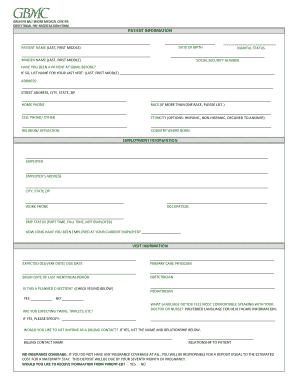
Get Md Gbmc Obstetrical Pre-registration Form
How it works
-

Open form follow the instructions
-

Easily sign the form with your finger
-

Send filled & signed form or save
How to fill out the MD GBMC Obstetrical Pre-Registration Form online
Filling out the MD GBMC Obstetrical Pre-Registration Form online is a crucial step in ensuring a smooth admission process for expectant users. This guide provides detailed instructions to help users navigate through each section of the form with confidence and clarity.
Follow the steps to complete the form online successfully.
- Click ‘Get Form’ button to access the MD GBMC Obstetrical Pre-Registration Form.
- Begin by entering your personal details in the 'Patient Information' section. This includes your date of birth, name (last, first, middle), and marital status. Make sure to include your maiden name if applicable.
- Provide your social security number, previous patient status at GBMC, and details of your last visit, if applicable. Fill in your home address, home phone number, race, cell phone number, ethnicity, religion/affiliation, and country of birth.
- In the 'Employment Information' section, fill out your employer's details, address, and your occupation. Indicate your employment status (part-time, full-time, not employed) and how long you have been employed.
- In the 'Visit Information' section, provide your expected delivery date, primary care physician, last menstrual period start date, and obstetrician details. Indicate if this is a planned C-section and if you are expecting multiples. State your preferred language for healthcare communication.
- If applicable, list a billing contact and provide their relationship to you. If you do not have insurance coverage, be aware of the deposit requirement for your maternity stay.
- Complete the 'Spouse Information or Parent/Policy Holder' section if relevant, providing the required details such as name, address, date of birth, and employer information.
- Fill out the 'Next of Kin/Emergency Contact' section with their name, relationship to you, contact numbers, and address.
- In the 'Primary Insurance Information' section, enter your insurance plan name, policy number, and primary policy holder's details. Ensure to provide the claim address, effective date of the plan, and verify coverage contact details.
- If you have secondary insurance, complete the second part of insurance information with similar details as the primary insurance section.
- Review all the information entered for accuracy. Once confirmed, save the changes to the document. You may also choose to download, print, or share the completed form as needed.
Start completing your MD GBMC Obstetrical Pre-Registration Form online now for a seamless pre-registration experience.
The rate of planned C-sections varies but typically accounts for about 15-20% of all births. These procedures usually happen when medical considerations make it safer for the mother or baby to choose a cesarean delivery in advance. Discussions with your healthcare provider can help you understand if this option is appropriate for you. When ready, utilize the MD GBMC Obstetrical Pre-Registration Form for an organized approach to your upcoming delivery.