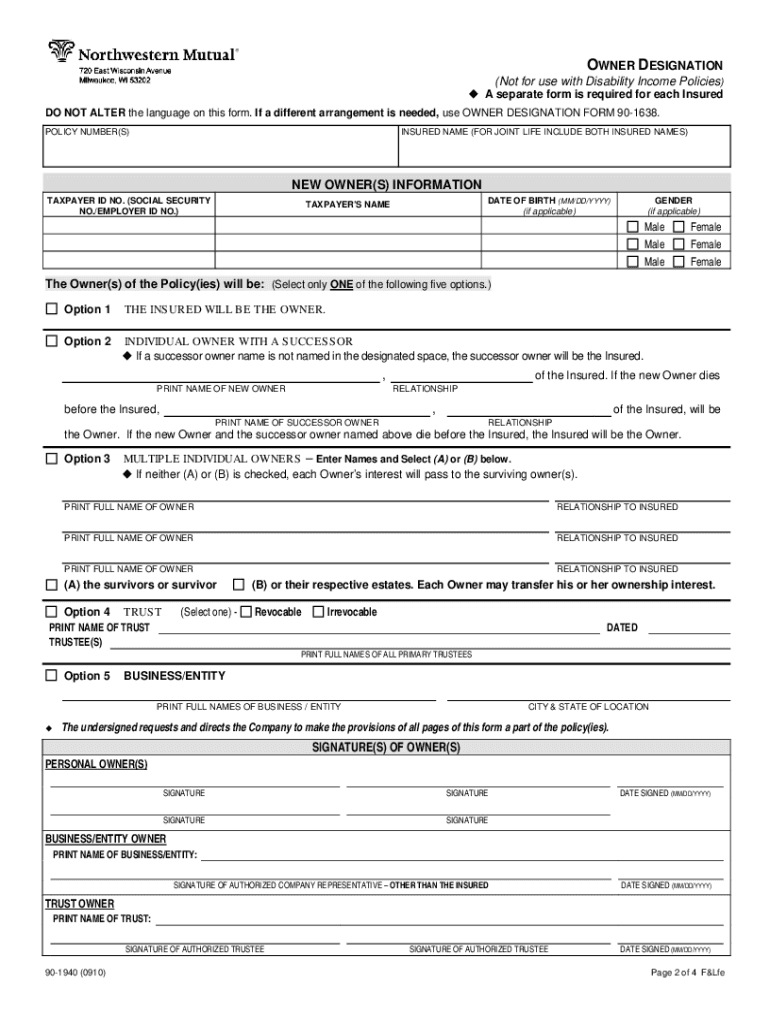
OWNER DESIGNATION REFERENCE PAGE Form 90-1940 NAMING A NEW OWNER The owner form 90-1940 is designed to cover the five most common owner transfers and successor owner designations. Only one ownership.
Loading

Open form follow the instructions

Easily sign the form with your finger

Send filled & signed form or save
How to fill out the Northwestern Mutual Form 90 1940 online
Completing the Northwestern Mutual Form 90 1940 online for owner designation is a straightforward process. This guide provides step-by-step instructions to ensure that users can accurately fill out the form with confidence.
Follow the steps to complete the form accurately.
- Click ‘Get Form’ button to access the form and open it in your editor.
- Begin by entering the policy number(s) associated with the insured individual at the designated section.
- Input the insured name, including both names if it's a joint life policy.
- Fill in the new owner's information, including their taxpayer identification number and date of birth if applicable.
- Select one of the provided ownership options to designate the new owner. Ensure only one option is selected as outlined in the form.
- If applicable, enter details for the successor owner, including their name and relationship to the insured.
- Ensure you complete the signature section. The owner(s) need to sign and provide the date signed.
- Once all fields are filled out, review the information for accuracy and completeness.
- Finally, you can save your changes, download the completed form, print it out, or share it as needed.
Ensure timely processing by completing your documents online today.
Experience a faster way to fill out and sign forms on the web. Access the most extensive library of templates available.
Related content
For additional forms required by NMIS, refer to the Investment ... and submit the...
by D Russell — into some other type of investment vehicle preferably a mutual fund. The...
The city is home to two major professional sports teams, the Bucks and Brewers. It is home...
Get answers to your most pressing questions about US Legal Forms API.
How do I get my 1099 from Northwestern Mutual?
Log into our client website and select the Documents page from the drop down menu. 1099 documents will be displayed under the document type “Tax Documents”.
How do I surrender my Northwestern whole life policy?
If you need to cancel your Northwestern Mutual Life Insurance Policy, you can do so by contacting customer service at 866-950-4644.
Can I cancel my life insurance policy and get my money back?
Do you get your money back if you cancel your life insurance? The answer to this is usually no. Protection insurance is a simple product that protects you financially against death and illness while you pay premiums. If you don't pay your insurance premiums, you aren't protected.
Can I cash out my Northwestern Mutual life insurance policy?
You can make withdrawals and transfers to another income plan at any time at no charge. The current interest rate is payable for the calendar year and may change annually, as determined by Northwestern Mutual.
How do I file a death claim with Northwestern Mutual?
If you have any documentation you would like to provide us, such as a death certificate or funeral home assignment, please e-mail to LifeBenefits@Northwesternmutual.com. If you have any questions, call client services at 1-800-635-8855, between 7AM and 6PM CST.
How do I surrender my life insurance policy for cash?
Easy and fast: Surrendering your policy is an easy and fast process. Simply tell your insurance company that you'd like to surrender and let them work out the details of your policy to determine the fees you'll have to pay and the cash surrender value you'll get back.
Can I turn my life insurance policy into cash?
Can you cash out a life insurance policy before death? If you have a permanent life insurance policy, then yes, you can take cash out before your death.
What is the lawsuit against Northwestern Mutual?
Northwestern Mutual Life Insurance was hit with a class action Friday in New York Southern District Court. The lawsuit, filed by the Boonswang Law Firm, accuses Northwestern of failing to follow state regulations affording protections to life insurance policyholders amid COVID-19.
Use professional pre-built templates to fill in and sign documents online faster. Get access to thousands of forms.
If you believe that this page should be taken down, please follow our DMCA take down process here.