Loading
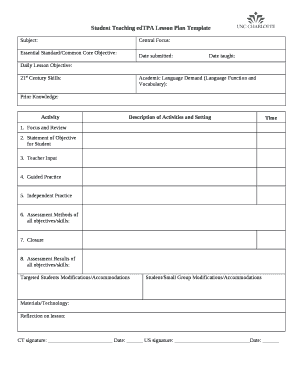
Get Edtpa Lesson Plan Template 2020 Pdf
How it works
-

Open form follow the instructions
-

Easily sign the form with your finger
-

Send filled & signed form or save
How to fill out the Edtpa Lesson Plan Template 2020 Pdf online
Filling out the Edtpa lesson plan template is a crucial step for educators during their student teaching experience. This guide offers clear, step-by-step instructions to help users complete the form online efficiently and accurately.
Follow the steps to complete your lesson plan template online.
- Click the ‘Get Form’ button to access the Edtpa lesson plan template. This action will allow you to open the form in your preferred editor.
- Begin by filling out the 'Subject' field where you should indicate the specific subject area your lesson plan addresses.
- Next, in the 'Central Focus' section, describe the main theme or concept of your lesson, ensuring it aligns with your objectives.
- In the 'Essential Standard/Common Core Objective' field, specify the educational standards that your lesson aligns with.
- Provide the 'Date Submitted' and 'Date Taught' to track when your lesson plan was finalized and when it is being taught.
- Outline the 'Daily Lesson Objective,' ensuring you state what students should achieve by the end of the lesson.
- In the '21st Century Skills' section, list the skills you aim to develop in your students through this lesson.
- Fill out the 'Academic Language Demand' by detailing the specific language functions and vocabulary that will be necessary for your lesson.
- Document 'Prior Knowledge' to show what students need to know before engaging with your lesson content.
- In the 'Activity' section, describe the specific activities you will conduct during the lesson.
- List the 'Description of Activities and Setting' to clarify how and where the lesson will take place.
- Indicate the 'Time' allocated for each part of your lesson to help with pacing.
- For the 'Focus and Review' section, note how you will begin the lesson to engage students.
- In the 'Statement of Objective for Student' field, articulate the objectives from the student's perspective.
- Describe your 'Teacher Input' to explain how you will teach the lesson content.
- Outline your 'Guided Practice' detailing how you will support students during the learning process.
- Specify the 'Independent Practice' tasks students will complete on their own.
- Explain the 'Assessment Methods of all objectives/skills' to convey how students' understanding will be evaluated.
- In the 'Closure' section, summarize how you will conclude the lesson.
- Document the 'Assessment Results of all objectives/skills' to report on student performance.
- Identify any 'Targeted Students Modifications/Accommodations' you will implement.
- Provide details for 'Student/Small Group Modifications/Accommodations' as necessary.
- List the 'Materials/Technology' required for your lesson to ensure you are prepared.
- Reflect on the lesson in the 'Reflection on lesson' section, considering what worked well and what could improve.
- Have your cooperating teacher sign and date the form in the respective fields.
- Finally, save your changes, then download, print, or share your completed lesson plan template.
Start filling out your Edtpa lesson plan template online today!
Here's a step-by-step guide to writing an effective lesson plan. Step 1: Determine the Scope of Your Lesson Plan. ... Step 2: Identify Key Learning Objectives. ... Step 3: Plan Specific Activities and Tasks. ... Step 4: List the Required Materials. ... Step 5: Create a Timeline. ... Step 6: Leave Space for Notes and Feedback.