Loading
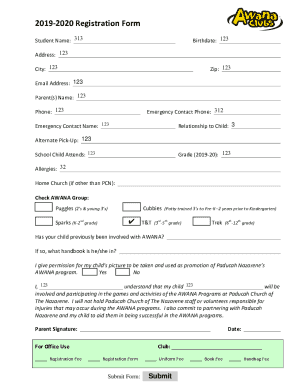
Get 2019-2020-awana-registration-form.docx
How it works
-

Open form follow the instructions
-

Easily sign the form with your finger
-

Send filled & signed form or save
How to fill out the 2019-2020-AWANA-Registration-Form.docx online
This guide will provide you with step-by-step instructions on how to effectively fill out the 2019-2020-AWANA-Registration-Form.docx online. By following these detailed instructions, you can ensure that all necessary information is accurately provided for your child's registration in the AWANA program.
Follow the steps to complete the registration form online.
- Press the ‘Get Form’ button to access the registration form and open it in your selected editor.
- Begin by filling in the student name in the designated field. Ensure the name is spelled correctly and is the full legal name of the child.
- Enter the birthdate of the child in the specified format to ensure proper age verification.
- Fill in the address, city, and zip code fields, ensuring all information is complete and accurate.
- Provide a valid email address for communication purposes.
- Input the parent(s) or guardian(s) name in the relevant field, followed by their phone number.
- List an emergency contact name and phone number. This individual should be reachable in case of any emergencies.
- Indicate the relationship of the emergency contact to the child.
- If applicable, provide information for any alternate pick-up persons authorized to collect the child.
- Select the current grade of the child for the 2019-2020 school year from the dropdown or checkboxes.
- Provide the name of the school the child attends.
- If applicable, list any known allergies your child has in the appropriate field.
- If your home church is different from Paducah Nazarene, indicate it in the provided space.
- Check the appropriate AWANA group that aligns with your child's age and developmental stage.
- Respond to the question about previous AWANA involvement and specify which handbook the child is currently using, if applicable.
- Choose whether you give permission for your child’s picture to be taken for promotional purposes by marking the yes or no box.
- Read and understand the liability statement before signing your name as a parent or guardian and adding the date.
- Consult the ‘For Office Use’ section, where you may indicate registration fees and other required payments.
- Lastly, once all fields are completed, save your changes, download or print the filled form as necessary, or share it if required.
Complete the registration form online today to ensure your child is enrolled in the AWANA program!
Industry-leading security and compliance
US Legal Forms protects your data by complying with industry-specific security standards.
-
In businnes since 199725+ years providing professional legal documents.
-
Accredited businessGuarantees that a business meets BBB accreditation standards in the US and Canada.
-
Secured by BraintreeValidated Level 1 PCI DSS compliant payment gateway that accepts most major credit and debit card brands from across the globe.