Loading
Get Athletic Facility Rental Request Form
How it works
-

Open form follow the instructions
-

Easily sign the form with your finger
-

Send filled & signed form or save
How to fill out the ATHLETIC FACILITY RENTAL REQUEST FORM online
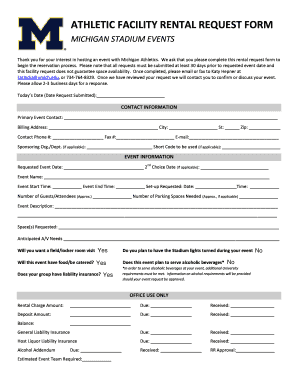
Completing the Athletic Facility Rental Request Form is an essential step in reserving a space for your event with Michigan Athletics. This guide provides a detailed overview of each section of the form, ensuring that you can accurately submit your request.
Follow the steps to effectively complete the form.
- Click ‘Get Form’ button to obtain the form and open it in the editor.
- Enter today's date in the designated field to indicate when the request is being submitted.
- Fill in the contact information. Include the primary event contact's name, billing address, phone number, fax number, email address, and if applicable, the sponsoring organization and short code.
- In the event information section, input the requested event date and a second-choice date if necessary. Provide the event name, start time, end time, and requested setup date and time.
- Estimate and enter the number of guests or attendees expected, along with the approximate number of parking spaces needed.
- Provide a detailed event description to clarify the purpose and nature of your event.
- Specify the space or spaces you are requesting and any anticipated audio/visual needs.
- Indicate whether you would like a field or locker room visit, if your event will include food or catered services, and if your group has liability insurance.
- Confirm whether you plan to have the stadium lights turned on during your event and if your event will serve alcoholic beverages, noting that additional university requirements may apply in such cases.
- Once all sections are completed, review the form for accuracy. Save any changes made before downloading, printing, or sharing the completed form as needed.
Complete your rental request form online today to ensure a smooth reservation process!