Loading
Get Nm Request For Verification
How it works
-

Open form follow the instructions
-

Easily sign the form with your finger
-

Send filled & signed form or save
How to fill out the NM Request For Verification online
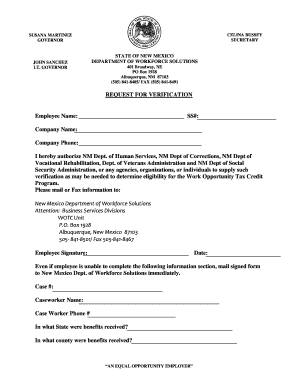
The NM Request For Verification is a crucial document for determining eligibility for the Work Opportunity Tax Credit Program. This guide provides a comprehensive overview of how to fill out the form online, ensuring clarity and accuracy in each required section.
Follow the steps to complete your NM Request For Verification effectively.
- Click ‘Get Form’ button to obtain the NM Request For Verification and open it in the editor.
- Begin by entering the employee name in the designated field. Ensure that the name matches the official name associated with the Social Security number.
- Next, fill in the Social Security number (SS#). Verify that the number is accurate to prevent any delays in processing.
- Input the company name in the corresponding space. This should reflect the legal name of the company employing the individual.
- Provide the company phone number. This should be a contact number where the company can be reached easily for any follow-up.
- Authorize the release of information by confirming the statement regarding the NM Department of Human Services and other agencies. This may involve checking a box or providing a signature as specified.
- Indicate where to send the verification by adding the appropriate address or contact method outlined in the form.
- Sign and date the form in the designated area. The employee signature is crucial for the validation of the request.
- If applicable, complete the following information regarding the case number, caseworker name, and caseworker phone number. This information aids in processing.
- Detail the state and county where benefits were received, which provides additional context for the verification process.
- After filling out all relevant information, review the form for any errors or omissions. Ensure that all fields are completed appropriately.
- Once satisfied with the provided information, proceed to save changes, download, or print the form. It may also be shared as needed with the New Mexico Department of Workforce Solutions.
Complete your NM Request For Verification online to ensure timely processing and eligibility determination.
Related links form
Applicants for a New Mexico nursing license by endorsement will need to submit: An online RN/LPN endorsement application. Payment of the $150 application and licensure fee. License verification via NURSYS or paper verification form. 3M Cogent background and fingerprinting, plus $44 fee.