Loading
Get Irs 14039-b (sp) 2021-2026
This website is not affiliated with IRS
How it works
-

Open form follow the instructions
-

Easily sign the form with your finger
-

Send filled & signed form or save
How to fill out the IRS 14039-B (SP) online
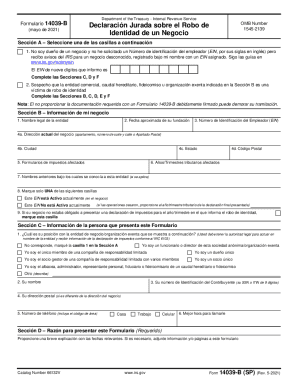
Filling out the IRS 14039-B (SP) form online is an essential step for users who have experienced identity theft related to their business. This guide provides clear, step-by-step instructions to help you navigate the form easily and accurately.
Follow the steps to complete the IRS 14039-B (SP) form online.
- Click ‘Get Form’ button to access the IRS 14039-B (SP) form online and open it for editing.
- In Section A, choose the appropriate box based on your situation. Select whether you are a business owner or suspect identity theft regarding a business entity.
- Proceed to Section B and provide the required information about your business, including the legal name, EIN, address, and affected tax forms.
- Complete Section C with your personal information, such as your name, taxpayer identification number, position in the business, and contact details.
- In Section D, clearly explain the reason for filing the form, including relevant dates and details of the identity theft.
- Attach any necessary supporting documentation in Section E, ensuring you include copies of identity verification documents as specified.
- Finally, sign and date the form in Section F, affirming that the information provided is truthful and accurate, and save your changes.
- You may then save, download, print, or share the completed form as needed.
Begin filling out the IRS 14039-B (SP) form online today to address your identity theft concerns.
Filing Form 14039, Identity Theft Affidavit It can be completed online, printed and attached to a paper tax return for mailing to the IRS. Or taxpayers may complete the form online at the Federal Trade Commission and the FTC will electronically transfer the Form 14039 – but not the tax return – to the IRS.