Loading
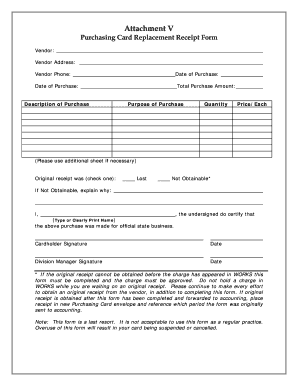
Get Bgs Lost Receipt Vermont Form
How it works
-

Open form follow the instructions
-

Easily sign the form with your finger
-

Send filled & signed form or save
How to fill out the Bgs Lost Receipt Vermont Form online
This guide provides clear instructions on how to complete the Bgs Lost Receipt Vermont Form online. It will help users navigate through each section of the form with confidence and ease.
Follow the steps to complete the form successfully.
- Press the ‘Get Form’ button to access the form and open it in the editor.
- Enter the vendor's name in the designated field.
- Fill in the vendor's address, ensuring all necessary details are included.
- Input the date of purchase accurately.
- Provide the vendor's phone number for contact purposes.
- State the total purchase amount in the appropriate section.
- Re-enter the date of purchase as required.
- Describe the purchase in detail to clarify what was bought.
- Explain the purpose of the purchase briefly.
- Indicate the quantity of items purchased.
- Enter the price per item.
- If additional space is needed, use the extra sheet as indicated.
- Choose whether the original receipt was lost or not obtainable by checking the appropriate box.
- If the receipt is not obtainable, provide an explanation for why it cannot be obtained.
- Type or clearly print your name as the undersigned person certifying the transaction.
- Sign and date the form in the cardholder signature section.
- Have the division manager sign and date the form in their designated section.
- Once all fields are completed, save your changes, download, print, or share the form as needed.
Complete your documents online today to ensure a smooth processing experience.
Get form
Experience a faster way to fill out and sign forms on the web. Access the most extensive library of templates available.
Get This Form Now!
Use professional pre-built templates to fill in and sign documents online faster. Get access to thousands of forms.