Loading
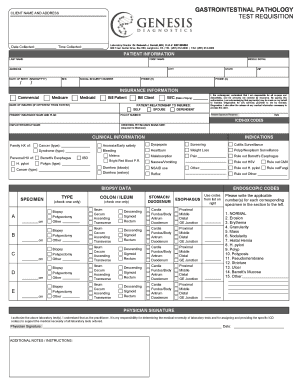
Get Gi Pathology Services Test Requisition Form - Genesis
How it works
-

Open form follow the instructions
-

Easily sign the form with your finger
-

Send filled & signed form or save
How to fill out the GI Pathology Services Test Requisition Form - Genesis online
Filling out the GI Pathology Services Test Requisition Form - Genesis online is a straightforward process that ensures essential patient information is accurately recorded for laboratory testing. This guide provides step-by-step instructions to assist you in completing the form efficiently.
Follow the steps to fill out the GI Pathology Services Test Requisition Form - Genesis online.
- Click the ‘Get Form’ button to access the GI Pathology Services Test Requisition Form - Genesis and open it in the designated editor.
- Begin by entering the client name and address. Ensure that the correct date and time of sample collection are provided in the relevant fields.
- In the patient information section, input the patient's last name, first name, middle initial, address, city, state, ZIP code, date of birth, sex, and social security number. Include the home and cell phone numbers as well.
- Navigate to the insurance information section. Indicate the insurance type by selecting the appropriate options such as Commercial, Medicare, or Medicaid. If applicable, note whether to bill the patient or client.
- Provide other necessary details regarding patient relationship to the insured, and include the name of the insured if it differs from the patient. Make sure to list the primary insurance name and plan, along with the policy number.
- Complete the clinical information section by checking all relevant family and personal medical history items, as well as any indications for testing.
- Select the type of procedure by checking the appropriate boxes for colon, ileum, stomach, duodenum, or esophagus, and specify the biopsy site and details as required.
- Fill in the biopsy data by assigning applicable codes for specimens listed. Use the provided list on the right to ensure accuracy.
- The final step is to add the physician's signature and date, confirming the authorization for the laboratory tests and the physician's responsibility for determining the medical necessity of the tests.
- After completing the form, users can save changes, download a copy, print for physical submission, or share the form as necessary.
Complete your GI Pathology Services Test Requisition Form - Genesis online today to ensure a smooth submission process.
Surgical pathology involves gross and microscopic examination of surgical specimens, as well as biopsies submitted by surgeons and non-surgeons such as general internists, medical subspecialists, dermatologists, and interventional radiologists.