Loading
Get Lis Deped
How it works
-

Open form follow the instructions
-

Easily sign the form with your finger
-

Send filled & signed form or save
How to fill out the Lis Deped online
This guide provides detailed instructions on how to fill out the Lis Deped form online. Whether you are a first-time user or seeking a refresher, this comprehensive resource will help you navigate each section with ease.
Follow the steps to successfully fill out the Lis Deped form.
- Click ‘Get Form’ button to access the Lis Deped form and open it in your online editor.
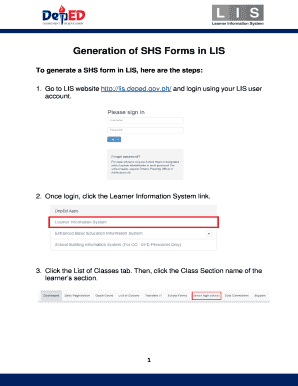
- Log in to your LIS user account to begin the form-filling process.
- After logging in, select the Learner Information System link to proceed.
- Navigate to the List of Classes tab and click on the Class Section name associated with the learner’s section.
- Locate the appropriate SHS form available for each semester, keeping in mind that SF5B is only available for Grade 12 during the second semester.
- Search for the Section/Class Name, click on the School Form button, and then select the specific School Form you need to generate.
- To generate the necessary School Form 5 and School Form 6, simply click on the corresponding School Form.
Complete your documents online to ensure a smooth filing process.
Library & Information Science (LIS)
Industry-leading security and compliance
US Legal Forms protects your data by complying with industry-specific security standards.
-
In businnes since 199725+ years providing professional legal documents.
-
Accredited businessGuarantees that a business meets BBB accreditation standards in the US and Canada.
-
Secured by BraintreeValidated Level 1 PCI DSS compliant payment gateway that accepts most major credit and debit card brands from across the globe.