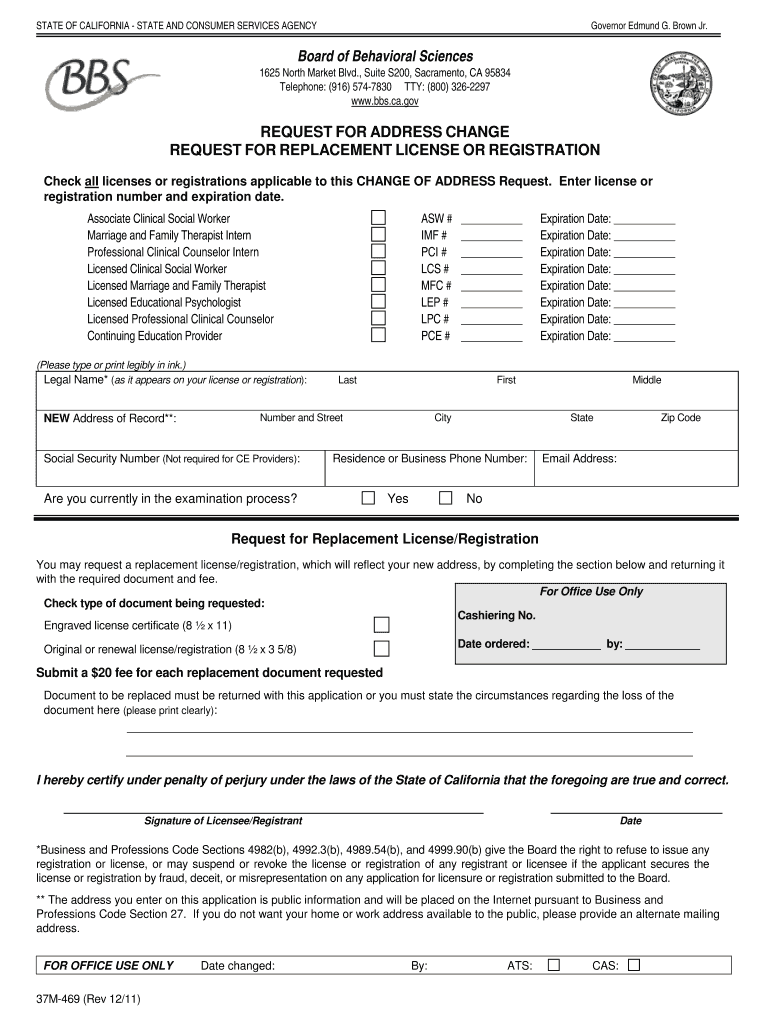
Suite S200 Sacramento CA 95834 Telephone 916 574-7830 TTY 800 326-2297 www. bbs. ca.gov REQUEST FOR ADDRESS CHANGE REQUEST FOR REPLACEMENT LICENSE OR REGISTRATION Check all licenses or registrations applicable to this CHANGE OF ADDRESS Request. STATE OF CALIFORNIA - STATE AND CONSUMER SERVICES AGENCY Governor Edmund G* Brown Jr. Board of Behavioral Sciences 1625 North Market Blvd. Enter license or registration number and expiration date. Associate Clinical Social Worker Marriage and Family Therapist Intern Professional Clinical Counselor Intern Licensed Clinical Social Worker Licensed Marriage and Family Therapist Licensed Educational Psychologist Licensed Professional Clinical Counselor Continuing Education Provider Please type or print legibly in ink. Legal Name as it appears on your license or registration NEW Address of Record ASW IMF PCI LCS MFC LEP LPC PCE Last City Yes Middle State Residence or Business Phone Number Are you currently in the examination process Expiration Date Fi....
Loading

Open form follow the instructions

Easily sign the form with your finger

Send filled & signed form or save
How to fill out the CA BBS 37M-469 online
This guide provides a comprehensive overview of how to complete the CA BBS 37M-469 form online. Whether you are requesting an address change or a replacement license or registration, this step-by-step guide will ensure that you fill out the form accurately and efficiently.
Follow the steps to complete the CA BBS 37M-469 form online.
- Press the ‘Get Form’ button to obtain the CA BBS 37M-469 online form and open it in the editor.
- Begin by filling in your legal name as it appears on your license or registration. This must include your first name, middle name (if applicable), and last name.
- Next, enter your new address of record which includes the street number and name, city, state, and zip code.
- Provide your residence or business phone number, ensuring that it is accurate for contact purposes.
- Indicate whether you are currently in the examination process by selecting ‘Yes’ or ‘No’.
- Enter the expiration date of your current license or registration associated with each license type you hold.
- If you are requesting a replacement license or registration, make sure to check the box for the type of document you are requesting.
- Include any required fees by preparing a payment for the replacement document(s).
- If you have lost the document, state the circumstances regarding the loss clearly in the designated area.
- Finally, sign the form to certify that the information provided is true and correct under penalty of perjury. Also, enter the date of signing.
Complete your forms online with ease and ensure your information is up-to-date.
Experience a faster way to fill out and sign forms on the web. Access the most extensive library of templates available.
Related content
DCA BBS 37M-469 (Revised 08/2024). STATE OF CALIFORNIA – BUSINESS, CONSUMER SERVICES AND...
by KV Rosenberg · Cited by 2445 — U.S.-Canada population sizes for the current...
Jul 1, 2013 — Ordering Information, Parts, Accessories and Current List Pricing. Eaton...
Get answers to your most pressing questions about US Legal Forms API.
How to find FTB ID number?
Finding your FTB ID number involves checking correspondence from the California Franchise Tax Board, where this number is typically mentioned. Alternatively, you can access this information by logging into your online account with the FTB. If you need further assistance, uslegalforms is here to help you locate and manage your tax-related information easily.
How to look up state ID number?
To look up your state ID number, visit the California Secretary of State’s online portal. You can enter your business name or entity number to retrieve your state ID information. If you face any challenges, uslegalforms provides tools and resources that can assist you in navigating this search easily.
Can you change your BBS address?
Yes, you can change your BBS address in California by submitting an address change form to the California Bureau of Business Services. This ensures that your business is compliant and maintains accurate records. For detailed steps or assistance with this process, consider using uslegalforms to simplify the necessary paperwork associated with your address change.
How to get California Secretary of State identification number?
You can acquire your California Secretary of State identification number by filing the necessary forms with the Secretary of State's office when you register your business. Typically, this number is issued alongside your entity number. If you have specific questions, uslegalforms can guide you through the requirements and forms needed to secure this number efficiently.
How do I get my California Secretary of State entity number?
To obtain your California Secretary of State entity number, you first need to register your business with the California Secretary of State's office. This process includes filling out the appropriate forms for your business type. Once your registration is approved, you will receive your unique entity number. If you require assistance, uslegalforms offers comprehensive resources to help streamline this process.
What is the 90-day rule for marriage?
The 90-day rule in marriage often refers to waiting periods related to marriage licenses and various other legal requirements before a union is formally recognized. This rule may vary by jurisdiction, but it often allows couples to finalize their commitments responsibly. Social workers must understand these rules, especially when addressing life transitions within the community under CA BBS 37M-469.
What is the point of the 90-day rule?
The 90-day rule serves to protect both employees and employers by establishing a trial period during which performance and fit are assessed. This timeframe allows both parties to evaluate if the employment situation is beneficial. Understanding this context is particularly useful for social workers navigating opportunities within frameworks like CA BBS 37M-469.
What is the California 7 year rule?
The California 7 year rule pertains to the removal of certain legal debts and records from your credit report after seven years. This helps individuals regain financial stability and improve their credit scores over time. It is vital for professionals, including LCSWs under CA BBS 37M-469, to know how this might affect their financial planning and career moves.
What is the 90 day rule in California?
The 90-day rule generally applies to various employment and contractual rights, determining how certain benefits or eligibility criteria come into effect. For instance, it can influence when probation periods end and full benefits kick in. Grasping these regulations is essential for professionals, including those looking to excel under the guidelines of CA BBS 37M-469.
What is the 90-day flip rule in California?
The 90-day flip rule refers to a regulation affecting benefits and employment practices, particularly around terms of service and insurance. Under this rule, employees may experience a shift in their benefits after 90 days of employment. Understanding this concept can help individuals navigating workplace policies related to an exciting career in social work governed by CA BBS 37M-469.
Use professional pre-built templates to fill in and sign documents online faster. Get access to thousands of forms.
If you believe that this page should be taken down, please follow our DMCA take down process here.