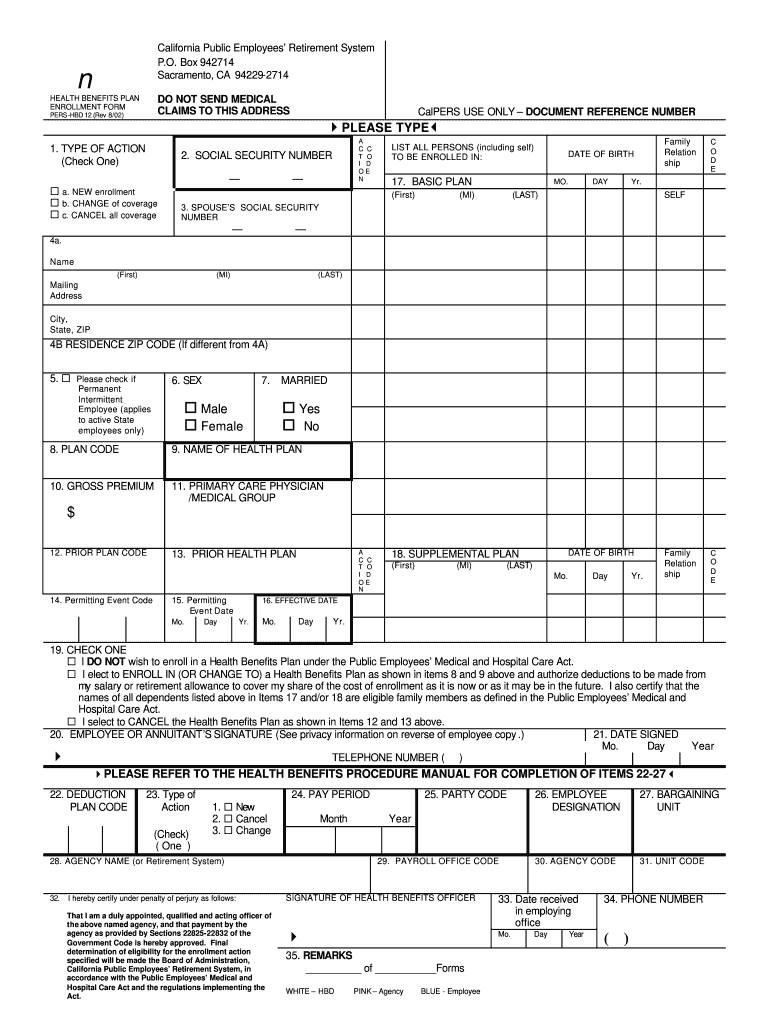
/02) CalPERS USE ONLY – DOCUMENT REFERENCE NUMBER 4PLEASE TYPE3 1. TYPE OF ACTION (Check One) A C C T O I D OE N 2. SOCIAL SECURITY NUMBER — ¨ a. NEW enrollment ¨ b. CHANGE of coverage ¨ c. CANCEL all coverage — LIST ALL PERSONS (including self) TO BE ENROLLED IN: 17. BASIC PLAN (First) MO. (MI) Family Relation ship DATE OF BIRTH DAY C O D E Yr. (LAST) SELF 3. SPOUSE’S SOCIAL SECURITY NUMBER — — 4a. Name (First) (MI) (LAST) Mailing Address City, State, ZIP .
Loading

Open form follow the instructions

Easily sign the form with your finger

Send filled & signed form or save
How to fill out the CA CalPERS HBD-12 online
The CA CalPERS HBD-12 is a crucial form for members seeking to enroll in health benefits. Completing this form accurately is essential for ensuring that you receive the appropriate health benefits coverage in a timely manner.
Follow the steps to accurately complete the CA CalPERS HBD-12 online.
- Click 'Get Form' button to obtain the form and open it in the editor.
- Begin by selecting the type of action you are taking. Check one of the options in Box 1: A for new enrollment, B for change of coverage, C for canceling all coverage.
- In Box 2, enter your Social Security number. If applicable, also provide the Social Security number of your spouse or domestic partner.
- Fill in Box 4A with your full name as shown on your appointment document along with your mailing address including City, State, and ZIP Code in Box 4B.
- Check the appropriate box in Box 5 if you are a permanent intermittent employee.
- In Boxes 6 and 7, indicate your sex by checking the corresponding box and your marital status by selecting Yes or No.
- Refer to the Health Program Guide or other resources to enter the correct plan code and health plan name in Boxes 8 and 9, respectively.
- Enter the gross premium amount in Box 10, and identify your primary care physician or medical group in Box 11.
- If changing plans, fill out Boxes 12 and 13 with the prior plan code and health plan.
- In Box 14, enter the appropriate code for the permitting event, and specify the date in Box 15.
- Write the effective date of your enrollment or change in Box 16.
- In Box 17 and/or 18, list all family members to be enrolled, using the action codes A for additions and D for deletions.
- Check one of the options in Box 19 to indicate your enrollment wishes, whether to enroll, cancel, or decline.
- Sign and date the form in Boxes 20 and 21, respectively, to authorize deductions and verify eligibility.
- Complete Boxes 22-27 if applicable, following the instructions pertaining to deduction codes and action types.
- Enter agency name, codes, and the signature of the Health Benefits Officer as required in Boxes 28-32.
- Finally, provide any additional information in Box 35 and double-check all entries before finalizing.
- Once all information is completed, save changes, download the form, print it, or share it as necessary.
Complete the CA CalPERS HBD-12 online now to ensure your health benefits enrollment is processed without delay.
Experience a faster way to fill out and sign forms on the web. Access the most extensive library of templates available.
Related content
To enroll or decline enrollment in the CalPERS Health Program or to make changes to your...
To enroll or decline enrollment in the CalPERS Health Program or to make changes to your...
Get answers to your most pressing questions about US Legal Forms API.
Can I submit my CalPERS retirement application online?
Yes, you can conveniently submit your CalPERS retirement application online through the official platform. This option simplifies the application process and allows you to track your application status efficiently. For anyone looking to retire soon, familiarize yourself with the CA CalPERS HBD-12 requirements to ensure a smooth submission.
What is the CalPERS pension after death?
After a CalPERS member passes away, their pension benefits may continue to their beneficiaries, depending on the plan selected. This ensures that your loved ones can receive financial support, even after your retirement. To navigate the specifics and get assistance with your options, consider examining your policy through the CA CalPERS HBD-12 documentation.
What is CalPERS HBD 12?
CalPERS HBD-12 stands for Health Benefits Data Report Form, which is crucial for tracking health benefits for retirees. This form helps ensure that all necessary health benefits are accounted for in your pension plan. Understanding the details within the CA CalPERS HBD-12 can simplify your retirement planning and help you secure the most out of your benefits.
What is the average CalPERS monthly pension?
The average CalPERS monthly pension varies based on years of service and final compensation. Generally, retirees might expect a pension that reflects their career earnings and the benefits accrued through their years of service. It's essential to review your specific plan and calculate your benefits based on the CA CalPERS HBD-12 guidelines to understand your potential pension.
What happens if you retire 6 months early?
Retiring six months early could reduce the monthly pension amount, as benefits are usually calculated based on age and years of service. A reduction in pension can impact your retirement lifestyle, making planning all the more crucial. If you are considering early retirement, exploring options like CA CalPERS HBD-12 can help anticipate potential outcomes.
What is the 6 month rule for CalPERS?
The 6 month rule states that if a member retires and returns to work within six months, they may not receive their pension benefits during that time. This rule exists to ensure pension fund integrity while allowing for professional transitions. Understanding this rule can help you navigate your retirement plans effectively. The details relating to CA CalPERS HBD-12 may provide additional context in this situation.
How many years do you need to work to be vested in CalPERS?
To become vested in CalPERS, a member must have at least five years of credited service. Being vested means you are entitled to a retirement benefit, which you can access once you reach retirement age. This is an important milestone, as it secures your financial future. Knowing your vesting period is essential to planning for benefits like those offered in CA CalPERS HBD-12.
What is the 960 rule for CalPERS?
The 960 rule is a guideline that determines how many hours a retired CalPERS member can work without affecting their pension. Essentially, it allows retirees to work up to 960 hours in a fiscal year while still receiving their retirement benefits. This flexibility is beneficial for those looking to remain active post-retirement. If you have questions about specific scenarios, CA CalPERS HBD-12 resources can provide guidance.
How does CalPERS 2% at 62 work?
CalPERS 2% at 62 allows eligible members to calculate their retirement benefits based on their highest average salary during 36 months of employment. To qualify, members must retire at age 62 or older. This formula helps secure a stable pension, providing financial support after retirement. Understanding this benefit is crucial, especially when considering the implications of CA CalPERS HBD-12.
How much is the CalPERS death benefit?
The CalPERS death benefit, specifically under the CA CalPERS HBD-12, varies based on the member’s pension plan and years of service. Generally, the benefit amount can range from a fixed sum to a percentage of the member's total contributions. It’s important to check your specific plan details for accurate figures. If you need assistance in navigating these benefits, consider using the US Legal Forms platform for comprehensive resources.
Use professional pre-built templates to fill in and sign documents online faster. Get access to thousands of forms.
If you believe that this page should be taken down, please follow our DMCA take down process here.
This form is available in several versions. Select the version you need from the drop-down list below.