Loading
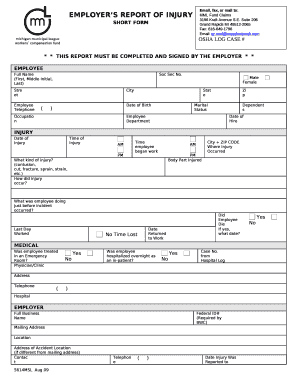
Get Employers Report Of Injury
How it works
-

Open form follow the instructions
-

Easily sign the form with your finger
-

Send filled & signed form or save
How to fill out the EMPLOYERS REPORT OF INJURY online
Filling out the Employers Report of Injury online can streamline the reporting process and ensure that all necessary information is accurately documented. This guide provides clear instructions on how to complete each section of the form effectively.
Follow the steps to complete the form accurately and efficiently.
- Click ‘Get Form’ button to access the Employers Report of Injury and open it in your preferred editing tool.
- Begin by entering the employee's full name, including their first name, middle initial, and last name. Ensure the name is spelled correctly, as it is crucial for identity verification.
- Input the employee's social security number. This field is essential for tracking and filing purposes, so accuracy is important.
- Fill in the street address, city, state, and zip code of the employee's residence. Make sure all addresses are current and complete.
- Enter the employee's telephone number, ensuring it is in the correct format, including area code.
- Specify the employee's date of birth, marital status, and number of dependents. This information helps in assessing claims and benefits.
- Record the employee's department and occupation, as these details provide context about their role and environment.
- Document the date of the injury and the time it occurred, including AM or PM to clarify the timing.
- Indicate the body part injured and describe the type of injury (such as contusion, cut, or fracture). Include details on how the injury occurred.
- Provide the last day the employee worked and whether any time was lost due to the injury. If applicable, note if the employee died as a result of the injury and the date of death.
- Input the medical treatment information, including whether the employee was treated in an emergency room or hospitalized overnight. Include the case number from the hospital log if available.
- Complete the employer's information, including the full business name, federal ID number, mailing address, and location of the accident if different from the mailing address.
- Finalize the report by signing and dating the preparer's signature. Ensure that the preparer’s name and title are printed clearly.
- Once all fields are completed accurately, save your changes, and prepare to submit the form through email, fax, or mail to the designated address.
Complete your Employers Report of Injury online to ensure prompt processing of your claim.
Related links form
How To Determine The Best Length For Your Email Subject Lines ...
University Access Authorization Form - The University Of Texas At ... - Utdallas
Pitney Bowes 8 Series Processes Quality Mail To ... - Intecsus
Oracle Enterprise Manager Installation And Configuration Guide For HP Service Manager Connector
For emergencies, immediately call 911. For non-emergency situations, contact and coordinate care with pre-arranged medical facilities as established with your workers' compensation insurance carrier's medical provider network. In-network care helps ensure prompt and efficient care for the employee.
Industry-leading security and compliance
US Legal Forms protects your data by complying with industry-specific security standards.
-
In businnes since 199725+ years providing professional legal documents.
-
Accredited businessGuarantees that a business meets BBB accreditation standards in the US and Canada.
-
Secured by BraintreeValidated Level 1 PCI DSS compliant payment gateway that accepts most major credit and debit card brands from across the globe.