Ntract - Birth Certificate of children - Joint Affidavit of two disinterested persons attesting to the correct name & date of birth of the applicant 2. If the above-stated documents are not available at the time of registration, comply immediately by submitting to the nearest SSS office to facilitate availment of benefits and privileges. REMINDERS 1. Issuance of SS number does not automatically qualify you for coverage. You must first be engaged in an occupation subject to SSS coverage. 2. An S.
Loading

Open form follow the instructions

Easily sign the form with your finger

Send filled & signed form or save
How to fill out the Sss Online Registration Form Philippines online
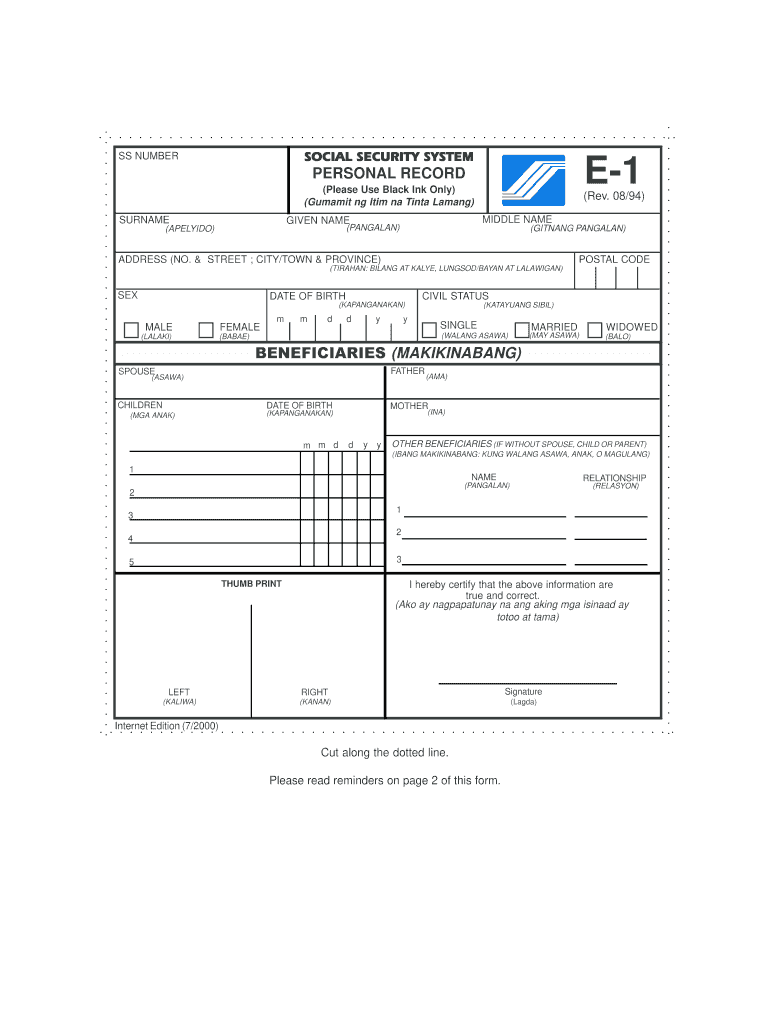
The Sss Online Registration Form is an essential document for individuals seeking to register with the Social Security System in the Philippines. This guide provides a clear, step-by-step approach to filling out the form, ensuring a smooth online registration process.
Follow the steps to complete your registration successfully.
- Click the ‘Get Form’ button to obtain the Sss Online Registration Form and open it in your desired editing application.
- Carefully enter your personal information in the required fields, including your full name, date of birth, and civil status. Ensure to use black ink only when finalizing your submission.
- Fill in your current address, including your house number, street, city or town, and province. This information is crucial for your registration.
- Provide your sex by selecting either male or female. This is a standard demographic detail required for your records.
- List your beneficiaries. Enter the names and details of your spouse, children, and other beneficiaries as applicable.
- Complete the thumbprint section by placing your thumbprint in the designated area. This serves as a verification of your identity.
- Review all entered information for accuracy and completeness before saving your changes.
- Once you have confirmed that all information is correct, you can choose to save the changes, download the form, print it, or share it as needed.
Take action now and complete your Sss Online Registration Form online.
Experience a faster way to fill out and sign forms on the web. Access the most extensive library of templates available.
Related content
If you are a U.S. dual citizen or U.S. citizen living outside of the United States, please...
All employees (members of SSS) are encouraged to register online to be able to get a user...
The Social Security System is a state-run, social insurance program in the Philippines to...
Get answers to your most pressing questions about US Legal Forms API.
How do I register for first time SSS?
A person registering with the SSS for the first time as a prospective employee should accomplish Personal Record (SS Form E-1) and submit it with the original/certified true copy and photocopy of any of the primary or any two (2) of the secondary documents, one of which with photo and date of birth, acceptable in ...
How can I register my SSS account online?
Go to the new SSS online portal. ... Click the registration link in the SSS Member Login page. ... Choose one personal information you reported to SSS to proceed with the online registration. ... Fill out the SSS online registration form. ... Wait for an email reply from the SSS. ... Create your password.
What should I do if I'm unable to register my SSS account online?
Check the email from the SSS that states the reason/s for your unsuccessful registration. For example, if the name and/or birthdate you provided doesn't match your SSS records, repeat the SSS online registration steps and input your correct info this time. Try using another registration option, too.
How can I get my SSS user ID and password?
Go to the official SSS website. Click the Forgot User ID or Password? link on the My. ... Enter your CRN or SSS number (for member account) or Employer/HR Number (for employer account).
How do I create a user ID and password?
Go to the My SSS website (sss.gov.ph) Click Not yet registered in My.SSS Select one information as reported to SSS. Enter all information needed. A notice of registration will be sent to your registered email.
How can I register my SSS number?
Members can register by sending their SSS number and birthdate using the format "SSS REG
How can I activate my SSS account online?
Step 1: Go to the SSS online registration page. Step 2: Fill out the required information in the SSS online form. Step 3: Check your email after 30 minutes. Step 4: Activate your My.SSS account.
How can I register SSS online?
Step 1: Go to the SSS online registration page. ... Step 2: Fill out the required information in the SSS online form. ... Step 3: Check your email after 30 minutes. ... Step 4: Activate your My. ... Check and Update Your SSS Membership Information. ... Check Your SSS Contributions. ... Access SSS Online Services.
How can I recover my SSS online account?
If you can't access your SSS-registered email anymore (which means you won't receive the password reset link), have your online account reset. Send an email request to onlineserviceassistance@sss.gov.ph or visit the nearest SSS branch.
How can I register my SSS account?
Step 1: Visit the SSS website to enroll your bank account. ... Step 2: Log in to your My. ... Step 3: Visit Bank Enrollment link under E-Services Tab. ... Step 4: Select your Bank Name in the List. ... Step 5: Check your Email for Bank Confirmation Notice from SSS.
Use professional pre-built templates to fill in and sign documents online faster. Get access to thousands of forms.
If you believe that this page should be taken down, please follow our DMCA take down process here.