Loading
Get Partial Withdrawal Form - Se2
How it works
-

Open form follow the instructions
-

Easily sign the form with your finger
-

Send filled & signed form or save
How to fill out the Partial Withdrawal Form - SE2 online
Filling out the Partial Withdrawal Form - SE2 online can be an important step for users looking to manage their insurance withdrawals effectively. This guide provides clear, step-by-step instructions to help ensure the form is completed accurately and efficiently.
Follow the steps to complete your Partial Withdrawal Form - SE2 online.
- Click the ‘Get Form’ button to obtain the form and open it in your preferred online editor.
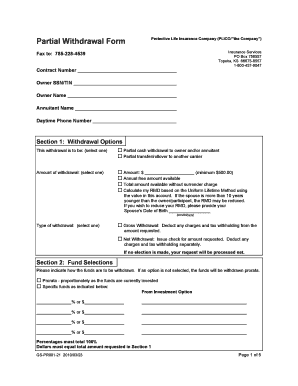
- Complete the owner information section, including the contract number, owner SSN/TIN, owner name, annuitant name, and daytime phone number. Ensure that all details are accurate and clearly legible.
- In Section 1, choose the withdrawal option by selecting either 'Partial cash withdrawal to owner and/or annuitant' or 'Partial transfer/rollover to another carrier'. Enter the withdrawal amount, keeping in mind the minimum of $500.00 or select the available options for annual free amounts.
- Indicate the type of withdrawal as either 'Gross Withdrawal' or 'Net Withdrawal'. Make sure to understand the implications of each option, particularly regarding tax withholding.
- Move to Section 2 and state how funds are to be withdrawn. Choose between prorata (proportionate) or specify the individual funds with corresponding percentages or dollar amounts that total 100%.
- If applicable, fill out Section 3 for any asset transfers to another carrier, including both the current account type and the new account type at the accepting carrier.
- Complete Section 4 by selecting the reason for distribution, applicable to qualified contracts only. Ensure you have the appropriate certifications for financial hardship if selected.
- Fill out Section 5 regarding Required Minimum Distribution (RMD) if eligible. Follow the instructions regarding the distribution year and withholding options.
- In Section 6, specify your tax withholding preferences. Choose one of the options regarding federal income tax withholding and provide any necessary specifics.
- In Section 7, select your preferred method for receiving the amount. Fill out the required information if you choose Electronic Funds Transfer or Wire Transfer.
- If you have any special instructions, complete Section 8 with necessary details.
- Lastly, ensure all necessary signatures are provided in Section 9. This includes the owner, joint owner (if applicable), participant, plan administrator, and any required consents.
- Review all sections for accuracy and completeness. After ensuring everything is in order, save changes, download, print, or share the form as needed.
Begin filling out your Partial Withdrawal Form - SE2 online today for a smoother experience!
We will only accept responsibility for forms that are faxed, e-mailed, or mailed in ance with the above instructions. Fax this form to: 1-413-226-4054 Retain this original and the fax machine's confirmation statement for your files.