Ract Excess Wages, item 13, from Total Wages, item 12. 15. Unemployment Tax Due. Multiply Taxable Wages, item 14, by your tax rate. 16. A State Unemployment Tax Avoidance (SUTA) Penalty Rate is assigned by the agency to employers who violate or attempt to violate SUTA laws. A rate of no less than 2% will be assigned to the employer. Multiply Taxable Wages, item 14, by your SUTA Penalty Rate. 1. The employer's name. If there is a change of address, or a change of ownership, please complete K-CN.
Loading

Open form follow the instructions

Easily sign the form with your finger

Send filled & signed form or save
How to fill out the KS K-CNS 100 online
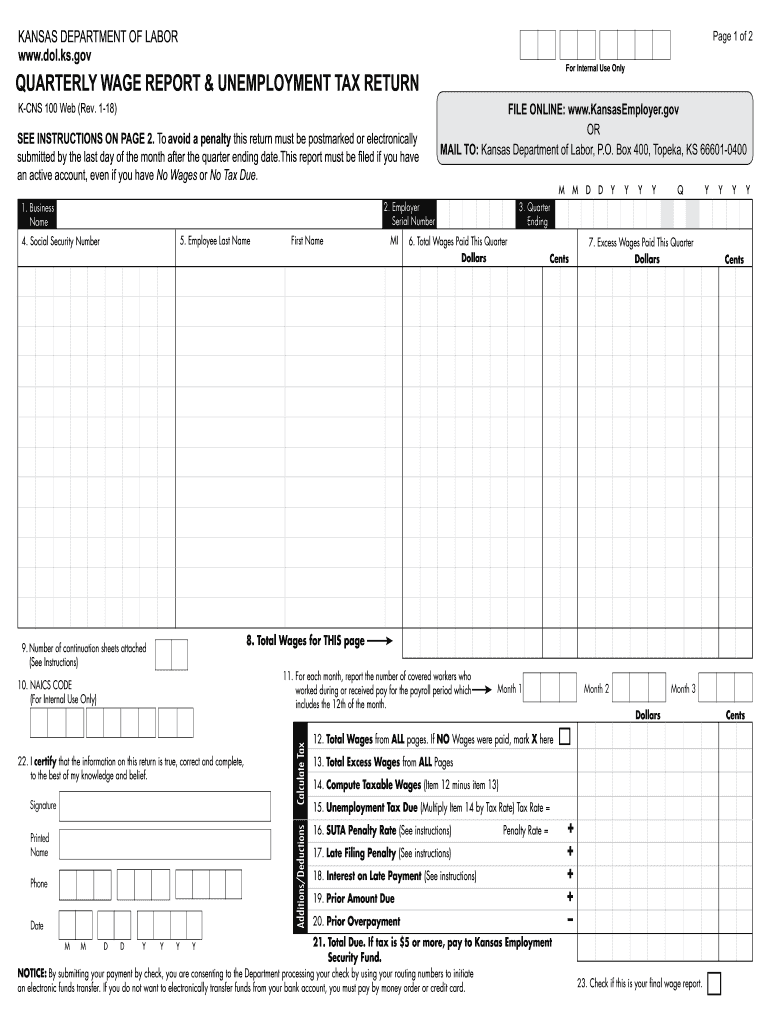
Filling out the KS K-CNS 100 form is essential for businesses in Kansas to report their quarterly wages and unemployment tax due. This guide provides clear and user-friendly instructions to help you complete the form accurately and efficiently.
Follow the steps to complete the KS K-CNS 100 form online.
- Click ‘Get Form’ button to obtain the form and open it in the editor.
- Provide your business name in the designated field, ensuring it is the same as listed in your official documents.
- Enter your six-digit unemployment tax number accurately in the appropriate section.
- Indicate the quarter ending date in the format MM/DD/YYYY, along with the corresponding quarter number.
- List the Social Security number for each employee in the relevant fields.
- Fill in the names of your employees: last name, first name, and middle initial in the required sections.
- Report the total wages paid to each employee during the quarter in the specified field. Ensure you record wages for the quarter they are received.
- If there are wages exceeding the $14,000 taxable wage base paid to an employee, report these excess wages in the appropriate section.
- Complete the calculation for total wages and excess wages for the page as directed, summing totals for the current page.
- Provide the number of continuation sheets attached, if any, to account for additional employees.
- Calculate the total taxable wages as instructed, and ensure you multiply by your designated tax rate to find the unemployment tax due.
- Input any penalties or interest on late payments if applicable, following the instructions carefully.
- Sign the form in the designated signature section and include your printed name and phone number.
- Review all entered information for accuracy before proceeding to submit the form.
- Once satisfied, you can save the changes, download the completed form, print it for your records, or share it as needed.
Complete your KS K-CNS 100 form online today for timely filing.
Experience a faster way to fill out and sign forms on the web. Access the most extensive library of templates available.
Related content
Quarterly Wage Report and Unemployment Tax Return (K-CNS 100) ... The form should be...
Kansas State University's construction science and management program enables graduates to...
by E Dias-Tosta — O uso da amantadina levou a efeitos colate- rais leves em 4 pacientes...
Get answers to your most pressing questions about US Legal Forms API.
How much is unemployment tax in KS?
In Kansas, the unemployment tax rate varies depending on a variety of factors, including the employer's experience rating. The KS K-CNS 100 system provides essential information about current rates and how they are determined. Employers should stay informed as these rates can change each year. For more comprehensive details and assistance, consider the tools available on the uslegalforms platform.
How do I file an amended Kansas tax return?
To file an amended Kansas tax return, you must complete the appropriate forms available through the KS K-CNS 100 portal. This process allows you to correct any errors or update information from your original return. Be sure to include any supporting documents that validate your amendments. For clarity and support, check the resources on the uslegalforms platform to simplify your filing experience.
How do I file an initial claim for unemployment in Kansas?
Filing an initial unemployment claim in Kansas involves accessing the KS K-CNS 100 website. You will need to provide personal information, work history, and the reason for separation from your last job. Completing your claim accurately will expedite the review process, helping you receive timely benefits. Visit the uslegalforms platform for helpful guides to navigate the application process.
How do I report a new hire in Kansas?
To report a new hire in Kansas, you must provide the employee's information through the KS K-CNS 100 system. Employers can easily submit details online or by mail, ensuring compliance with Kansas regulations. Reporting new hires promptly helps both employers and employees maintain a smooth onboarding process. For further assistance, explore the resources available on the uslegalforms platform.
How is Kansas unemployment calculated?
The calculation of Kansas unemployment benefits uses your highest earning quarters from a designated base period. Factors such as your work history and the total wages earned are crucial to determining your benefit amount. With the KS K-CNS 100, you can find streamlined information to help clarify this calculation process and ensure you receive the benefits you're entitled to.
How do you calculate how much unemployment you will receive?
To calculate your expected unemployment benefits, begin by reviewing your earnings during the base period. The KS K-CNS 100 provides formulas and steps to determine your weekly benefit amount based on these earnings. By inputting accurate figures, you can get a clearer picture of what you may receive.
What is the Kansas unemployment tax withholding?
Kansas allows individuals to choose whether to have state taxes withheld from their unemployment benefits. The standard withholding rate is 5% for state income tax, as indicated in the KS K-CNS 100. Understanding your options for tax withholding can help you manage your benefits more effectively.
How much is Kansas unemployment per week?
In Kansas, the weekly unemployment benefit can range from a minimum of $119 to a maximum of $540, depending on your previous earnings. The KS K-CNS 100 offers clarity on how these amounts are set and the factors that may influence your specific situation. Keep in mind that your actual benefit amount may differ based on eligibility assessments.
How is unemployment calculated in Kansas?
The calculation of unemployment benefits in Kansas considers your earnings from the base period, which typically refers to the first four of the last five completed calendar quarters. The KS K-CNS 100 provides detailed insights into how your weekly benefit amount is determined based on your earnings during this time. Understanding this calculation is key to knowing what support you may receive.
What disqualifies you from unemployment in Kansas?
In Kansas, employees can face disqualification from unemployment benefits for various reasons. If you voluntarily quit your job without a good cause, or if you were terminated for misconduct, you may lose your eligibility. The KS K-CNS 100 guides individuals through understanding these critical factors. Always consider seeking assistance from resources like uslegalforms to understand your rights.
Use professional pre-built templates to fill in and sign documents online faster. Get access to thousands of forms.
If you believe that this page should be taken down, please follow our DMCA take down process here.