Loading
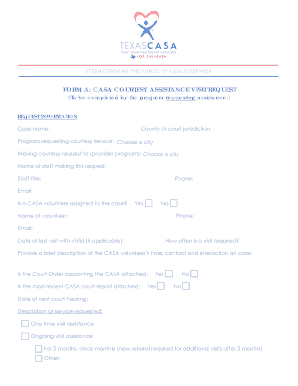
Get Form A: Casa Courtesy Assistance Visit Request
How it works
-

Open form follow the instructions
-

Easily sign the form with your finger
-

Send filled & signed form or save
How to fill out the FORM A: CASA COURTESY ASSISTANCE VISIT REQUEST online
Filling out the FORM A: CASA COURTESY ASSISTANCE VISIT REQUEST is essential for requesting courtesy assistance services effectively. This guide provides clear, step-by-step instructions to ensure that all users can complete the form accurately and efficiently.
Follow the steps to successfully complete the request form.
- Click ‘Get Form’ button to obtain the form and open it in the editor.
- Begin filling out the request information section. Start with the case name, county of court jurisdiction, and the program requesting the courtesy service. Select the appropriate city from the drop-down options.
- Enter the details of the staff making the request, including their name, title, phone number, and email address. Ensure all contact details are accurate for effective communication.
- Indicate whether a CASA volunteer is assigned to the case by selecting 'Yes' or 'No'. If applicable, provide the volunteer's name, phone number, and email address.
- Specify the date of the last visit with the child and how often visits are required. Then, provide a brief description of the CASA volunteer’s time, contact, and interaction on the case.
- Confirm if the Court Order appointing the CASA and the most recent CASA court report are attached by selecting 'Yes' or 'No' for both.
- Fill in the date of the next court hearing and describe the service requested. Options include one-time visit assistance, ongoing visit assistance, and further customization based on user needs.
- Provide the reason for the service requested and outline the goal or objective of the visit. Include any safety concerns regarding the child(ren) or placement, as well as critical data supporting the request.
- Complete the prioritization matrix by checking all applicable reasons for the request, particularly prioritizing those marked with an asterisk. This helps in assessing the urgency of the request.
- Enter child information including name, date of birth, gender, caregiver details, reason for placement, and further relevant information. Repeat this for each child as necessary.
- Fill out the placement information section by selecting the type and name of the current placement, and providing contact details of the contact person for the placement.
- Finally, obtain the required signatures from the requesting program staff and the executive director or program director along with the dates.
- Once all fields are complete, users can save changes, download, print, or share the form as needed.
Complete your FORM A: CASA COURTESY ASSISTANCE VISIT REQUEST online today to ensure timely and effective service.