Loading
Get Alberta Seniors Benefit Application Form
How it works
-

Open form follow the instructions
-

Easily sign the form with your finger
-

Send filled & signed form or save
How to fill out the Alberta Seniors Benefit Application Form online
The Alberta Seniors Benefit Application Form is essential for seniors seeking financial assistance. This guide provides clear, step-by-step instructions on how to complete the form online, ensuring you have all the necessary information for a successful application.
Follow the steps to complete your application form online.
- Click ‘Get Form’ button to obtain the form and open it in your preferred online editor.
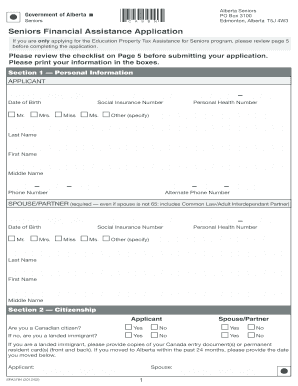
- In Section 1, provide your personal information as the applicant. Enter your full name, date of birth, Social Insurance Number, and Personal Health Number. Include your phone numbers to ensure contactability.
- Fill out the spouse or partner's information in the same section. Even if they are not yet 65, you still need to provide their details, including their full name, date of birth, and other requested information.
- Proceed to Section 2 and indicate your citizenship status for both you and your spouse or partner. Clearly state if you are a Canadian citizen or a landed immigrant, providing necessary documentation if applicable.
- In Section 3, provide your residence details, including your home address and mailing address if different. Specify your type of residence, which is crucial to assess your eligibility for the benefits.
- Move on to Section 4 and indicate whether you receive Old Age Security benefits. If you do, attach a photocopy of your Old Age Security Notice of Entitlement letter.
- In Section 5, fill out your direct deposit information. Attach a voided cheque to ensure timely processing of any benefits you may receive.
- Section 6 requires your signatures and those of your spouse or partner, if applicable. Make sure to read the authorization terms carefully before signing.
- If you're a trustee or have power of attorney, complete Section 7, confirming your legal authority to act on behalf of the applicant.
- Review Section 9, ensuring you include all necessary documents as listed. Photocopies are required for submitted items—do not send originals.
- Once you have completed all sections and attached all required documents, you can save your changes, download, print, or share the form as needed.
Start completing your Alberta Seniors Benefit Application Form online today to ensure you receive the financial assistance you may qualify for.
Get form
Experience a faster way to fill out and sign forms on the web. Access the most extensive library of templates available.
You should get a Seniors Financial Assistance application package in the mail six months before your 65th birthday. If you did not get this package, call the Alberta Supports Contact Centre at 1-877-644-9992. To be eligible you must: be 65 years of age or older.
Get This Form Now!
Use professional pre-built templates to fill in and sign documents online faster. Get access to thousands of forms.