Loading
Get Myportico
How it works
-

Open form follow the instructions
-

Easily sign the form with your finger
-

Send filled & signed form or save
How to use or fill out the Myportico online
Filling out the Myportico form is an essential step for accessing your ELCA health benefits. This guide will provide you with clear, step-by-step instructions to ensure that you complete the form accurately and efficiently.
Follow the steps to fill out the Myportico form successfully.
- Press the ‘Get Form’ button to access the form and open it for editing.
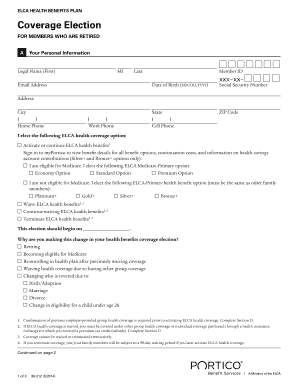
- Begin with your personal information by entering your legal name, middle initial, last name, email address, date of birth, and member ID. Ensure all details are accurate to avoid processing issues.
- Fill in your address, including city, state, ZIP code, and contact numbers (home, work, and cell phone). This information is vital for communication regarding your benefits.
- Choose the ELCA health coverage option you wish to select. If you are elderly, indicate your choice regarding Medicare. Carefully read the options and select the one that aligns with your needs.
- Provide a reason for any changes in your health benefits coverage election by checking the corresponding option. This section captures essential life changes impacting your health coverage.
- If applicable, move on to the sections for your eligible spouse and children. Fill in their names, dates of birth, and health coverage options, ensuring you select options consistent with coverage choices for family members.
- Complete Section D if you are activating or waiving coverage by providing details about other insurance coverage. Ensure to check the correct family member coverage option.
- Sign and date the form in the designated area to confirm your agreement with the ELCA Health Benefits Plan as indicated.
- Review the completed form for accuracy and clarity before submitting it. Once reviewed, save the changes and download the form for your records.
- Finally, print or share the completed form as instructed, and ensure it is returned to the Portico Service Center for processing. Be mindful of any submission deadlines.
Start filling out your Myportico form online today to secure your health benefits.