Loading
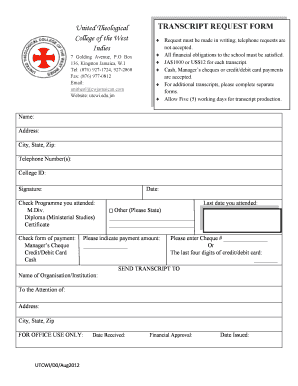
Get Utcwi Transcript Request - United Theological College Of The West ... - Utcwi Edu
How it works
-

Open form follow the instructions
-

Easily sign the form with your finger
-

Send filled & signed form or save
How to use or fill out the UTCWI Transcript Request - United Theological College Of The West online
Filling out the UTCWI Transcript Request form is a straightforward process. This guide will provide you with step-by-step instructions to help ensure that your request is submitted correctly and efficiently.
Follow the steps to complete your transcript request form.
- Click the ‘Get Form’ button to access the transcript request form. This will enable you to view and begin filling out the necessary fields online.
- Enter your personal information in the designated fields, including your name, address, city, state, zip code, telephone number, and college ID. Ensure that all details are accurate to avoid delays.
- Indicate your academic program by checking the appropriate box for the degree or certificate you attended, such as M.Div., Diploma in Ministerial Studies, or Certificate.
- Select your preferred form of payment by checking the box next to either Manager’s Cheque, Credit/Debit Card, or Cash.
- Provide the date you last attended the institution. If applicable, specify any additional details in the designated space.
- Clearly indicate the payment amount in the space provided, ensuring it corresponds with the expected fees.
- If applicable, enter your cheque number or the last four digits of your credit or debit card in the specified fields.
- In the section labeled 'SEND TRANSCRIPT TO', fill in the name of the organization or institution that should receive your transcript. Include the attention name (if required), address, city, state, and zip code.
- Review all the information you have entered for accuracy. Make sure all fields are completed before proceeding.
- Once you have confirmed that all information is correct, you can save your changes, download, print, or share the completed form as necessary.
Begin your transcript request process online and ensure your educational records are sent where needed.
You should complete the appropriate Transcript Request Form, available online through the MyOC Student Portal under Forms and Booklets. The payment for the transcript(s) maybe be made through your Site. The form, along with proof of payment, should be emailed to transcripts@open.uwi.edu or submitted to your Site.
Industry-leading security and compliance
US Legal Forms protects your data by complying with industry-specific security standards.
-
In businnes since 199725+ years providing professional legal documents.
-
Accredited businessGuarantees that a business meets BBB accreditation standards in the US and Canada.
-
Secured by BraintreeValidated Level 1 PCI DSS compliant payment gateway that accepts most major credit and debit card brands from across the globe.