Loading
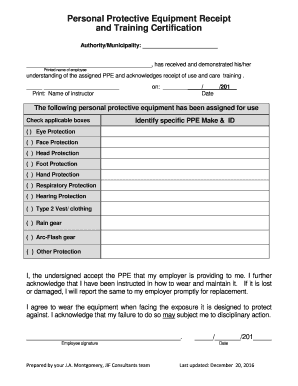
Get Personal Protective Equipment Receipt
How it works
-

Open form follow the instructions
-

Easily sign the form with your finger
-

Send filled & signed form or save
How to fill out the Personal Protective Equipment Receipt online
Filling out the Personal Protective Equipment Receipt is an important process for ensuring safety and compliance in the workplace. This guide provides clear, step-by-step instructions to help you complete the form accurately and efficiently.
Follow the steps to successfully complete the Personal Protective Equipment Receipt.
- Press the ‘Get Form’ button to obtain the form, which you can then open and access for filling out online.
- In the first section, enter the authority or municipality name where the equipment is being provided.
- Next, provide the printed name of the employee who is receiving the personal protective equipment (PPE).
- In the next field, input the name of the instructor who conducted the training on the PPE usage and care.
- Record the date when the training occurred by filling in the day, month, and year.
- Locate the section identifying the specific PPE assigned. Check all applicable boxes next to the type of equipment received, such as eye protection, face protection, etc.
- In the subsequent signature field, the employee must sign to acknowledge receipt of the PPE and confirm understanding of training on its use and care.
- Lastly, complete the date field next to the employee's signature to indicate when the form was signed.
- Once all fields have been filled out, you can save changes, download, print, or share the completed form as necessary.
Complete your Personal Protective Equipment Receipt online to ensure safety in your workplace.
Get form
Experience a faster way to fill out and sign forms on the web. Access the most extensive library of templates available.
Sales Tax Exemptions in California Medical devices such as prosthetics are exempted from sales tax. In addition, certain groceries, hot beverages, some types of farm items, and certain alternative-energy device are also considered to be exempt from the California sales tax.
Get This Form Now!
Use professional pre-built templates to fill in and sign documents online faster. Get access to thousands of forms.