Loading
Get Stanclift Cove
How it works
-

Open form follow the instructions
-

Easily sign the form with your finger
-

Send filled & signed form or save
How to fill out the Stanclift Cove online
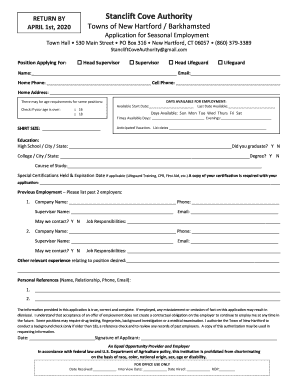
This guide provides clear, step-by-step instructions on completing the Stanclift Cove online form for seasonal employment. Whether you are an experienced applicant or filling out a form for the first time, this resource aims to support your application process.
Follow the steps to successfully complete your application.
- Click the ‘Get Form’ button to acquire the Stanclift Cove application form and open it in your online editor.
- In the 'Position Applying For' section, select the appropriate box for the role that interests you: Head Supervisor, Supervisor, Head Lifeguard, or Lifeguard.
- Enter your personal details including your full name, email address, home phone number, and cell phone number in the designated fields.
- Complete your home address accurately to ensure proper communication back to you.
- Indicate your age by checking the box if you are over 16 or 18, depending on the requirements of the position.
- Specify your availability by entering your available start date and last date available. Indicate the days of the week you are available, along with your preferred times during the day and evening.
- Select your shirt size in the provided section to assist with uniform distribution.
- List any anticipated vacation dates that may occur during your employment period.
- Input your educational background, including the name of your high school and college, location, with the graduation status for each institution.
- Provide details about any relevant certifications you hold, along with their expiration dates if applicable. Ensure to attach copies with your submission.
- List your previous employment by providing information about your last two employers, including company name, supervisor's contact details, job responsibilities, and whether they may be contacted for a reference.
- Outline any other relevant experiences that relate to the position you are applying for.
- Include personal references by noting their names, relationships to you, and their contact information.
- Review the statement regarding the truthfulness of your application and sign off on it. Note the date of your application.
- Once you have completed all sections of the form, save your changes, and you can then download, print, or share the application as needed.
Begin filling out your Stanclift Cove application online today to secure your position!
The Lake McDonough Beach and Swimming Recreation Area remains closed for 2023 due to a lack of lifeguards.
Industry-leading security and compliance
US Legal Forms protects your data by complying with industry-specific security standards.
-
In businnes since 199725+ years providing professional legal documents.
-
Accredited businessGuarantees that a business meets BBB accreditation standards in the US and Canada.
-
Secured by BraintreeValidated Level 1 PCI DSS compliant payment gateway that accepts most major credit and debit card brands from across the globe.