Loading
Form preview
  • US Legal Forms
  • Other Templates
  • More Forms
  • More Multi-State Forms
  • Patient Intake Form - Medstar Health

Get Patient Intake Form - Medstar Health

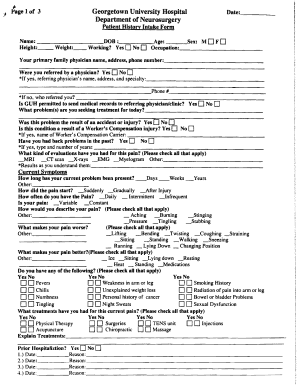
M 0 F 0 Occupation: Your primary family physician name, address, phone number: Were you referred by a physician? Yes 0 No 0 ""If yes, referring physician's name, address, and specialty: Phone# *Ifno.whorefunedyou? - ---------Is GUH permitted to send medical records to referring physician/cUnic? Yes 0 No 0.

How it works

  1. Open form

    Open form follow the instructions

  2. Easily sign form

    Easily sign the form with your finger

  3. Share form

    Send filled & signed form or save

How to Fill Out the Patient Intake Form - MedStar Health Online

Filling out the Patient Intake Form for MedStar Health online is a crucial step in ensuring you receive timely and appropriate care. This guide will provide you with detailed, step-by-step instructions to help you complete the form accurately and efficiently.

Follow the steps to complete the form correctly.

  1. Press the ‘Get Form’ button to obtain the Patient Intake Form and open it for editing.
  2. Begin by entering your name, height, weight, age, and sex in the appropriate fields. Be sure to enter accurate data to avoid any confusion. Select whether you are currently working.
  3. Provide the name, address, and phone number of your primary family physician. If referred by another physician, include their details as well. If not, indicate how you found MedStar Health.
  4. Indicate if MedStar Health is permitted to send your medical records to the referring physician or clinic by selecting 'Yes' or 'No'.
  5. Describe the problems you are seeking treatment for today. Specify if the issue resulted from an accident or injury and include relevant details about worker's compensation if applicable.
  6. Complete the section on current symptoms by providing the duration of your current problem and how the pain started. Check the frequency of your pain and its nature.
  7. List factors that worsen or alleviate your pain by checking the corresponding options provided.
  8. Complete the review of systems by checking any relevant symptoms. Indicate any treatments you have previously received for your current pain.
  9. Address any prior hospitalizations and their reasons, ensuring all fields are filled out completely.
  10. Finish by signing the form, indicating the date, and providing any additional requirements, such as the method of learning that works best for you.
  11. After ensuring all sections are filled out thoroughly, save your changes. You may then download, print, or share the completed form as necessary.

Start filling out your Patient Intake Form online today to ensure comprehensive care.

Get form

Experience a faster way to fill out and sign forms on the web. Access the most extensive library of templates available.
Get form

Related content

ATTACHMENT 3 CHARITY CARE AND FINANCIAL ...
uninsured patients and underinsured patients meeting medical hardship ... Application, and...
Learn more
Study Samples - Strong Heart Study
Penn Medical Laboratory in MedStar Health Research Institute is the custodian for...
Learn more
Universal Health Services - Wikipedia
In addition, UHS's facilities allegedly failed to develop and/or update individual...
Learn more

Related links form

Understanding Design Annotation PharmaCare Prescribes IBM E-business Solution To Cure Refill ... Information Extraction In The Life Sciences ... - Fraunhofer SCAI A Current-Awareness Bibliography - Theindexer

Questions & Answers

Get answers to your most pressing questions about US Legal Forms API.

Contact support

MedStar Washington Hospital Center associates For additional questions, please email us at MWHC-PFACQS@medstar.net. For more information, learn about the MedStar Institute for Quality and Safety.

MedStar Washington Hospital Center, a valued member of MedStar Health, is dedicated to delivering exceptional patient-firsthealth care. We provide the region with the highest quality care, thanks to thelatest medical advances in education and research.

MedStar Washington Hospital Center (Including MedStar Heart & Vascular Institute) After hours, URGENT media matters are handled 24 hours a day, seven days a week. Please call the on-call pager at 202-801-0862.

MedStar Washington Hospital Center associates For additional questions, please email us at MWHC-PFACQS@medstar.net. For more information, learn about the MedStar Institute for Quality and Safety.

Where to mail your application. If you have additional questions, please contact us at 301-877-5534 or email us at Martha.Miller@MedStar.net.

Patient intake forms are designed to expedite the paperwork process for new and existing patients at medical practices. Improving the patient intake process frees up time in the day for additional appointments and reduces stress on front desk staff.

Get This Form Now!

Use professional pre-built templates to fill in and sign documents online faster. Get access to thousands of forms.
Get form
If you believe that this page should be taken down, please follow our DMCA take down processhere.
Get Patient Intake Form - MedStar Health
Get form
  • Adoption
  • Bankruptcy
  • Contractors
  • Divorce
  • Home Sales
  • Employment
  • Identity Theft
  • Incorporation
  • Landlord Tenant
  • Living Trust
  • Name Change
  • Personal Planning
  • Small Business
  • Wills & Estates
  • Packages A-Z
  • Affidavits
  • Bankruptcy
  • Bill of Sale
  • Corporate - LLC
  • Divorce
  • Employment
  • Identity Theft
  • Internet Technology
  • Landlord Tenant
  • Living Wills
  • Name Change
  • Power of Attorney
  • Real Estate
  • Small Estates
  • Wills
  • All Forms
  • Forms A-Z
  • Other Templates
  • Legal Hub
  • About Us
  • Help Portal
  • Legal Resources
  • Blog
  • Affiliates
  • Contact Us
  • Delete My Account
  • Site Map
  • Industries
  • Forms in Spanish
  • Localized Forms
  • State-specific Forms
  • Forms Kit
  • Real Estate Handbook
  • All Guides
  • Notarize
  • Incorporation services
  • For Consumers
  • For Small Business
  • For Attorneys
  • USLegal
  • FormsPass
  • pdfFiller
  • signNow
  • altaFlow
  • DocHub
  • Instapage
Form Packages
  • Adoption
  • Bankruptcy
  • Contractors
  • Divorce
  • Home Sales
  • Employment
  • Identity Theft
  • Incorporation
  • Landlord Tenant
  • Living Trust
  • Name Change
  • Personal Planning
  • Small Business
  • Wills & Estates
  • Packages A-Z
Form Categories
  • Affidavits
  • Bankruptcy
  • Bill of Sale
  • Corporate - LLC
  • Divorce
  • Employment
  • Identity Theft
  • Internet Technology
  • Landlord Tenant
  • Living Wills
  • Name Change
  • Power of Attorney
  • Real Estate
  • Small Estates
  • Wills
  • All Forms
  • Forms A-Z
  • Other Templates
Customer Service
  • Legal Hub
  • About Us
  • Help Portal
  • Legal Resources
  • Blog
  • Affiliates
  • Contact Us
  • Delete My Account
  • Site Map
  • Industries
  • Forms in Spanish
  • Localized Forms
  • State-specific Forms
  • Forms Kit
Legal Guides
  • Real Estate Handbook
  • All Guides
Prepared for you
  • Notarize
  • Incorporation services
Our Customers
  • For Consumers
  • For Small Business
  • For Attorneys
Our Sites
  • USLegal
  • FormsPass
  • pdfFiller
  • signNow
  • altaFlow
  • DocHub
  • Instapage
Social Media
Call us now toll free:
+1 833 426 79 33
As seen in:
© Copyright 1999-2026 airSlate Legal Forms, Inc. 17 Station Street, Ste. 203, Brookline, MA 02445
  • Your Privacy Choices
  • Terms of Service
  • Privacy Notice
  • Content Takedown Policy
  • Bug Bounty Program