Loading
Get Ri Dc-38 2020-2026
How it works
-

Open form follow the instructions
-

Easily sign the form with your finger
-

Send filled & signed form or save
How to fill out the RI DC-38 online
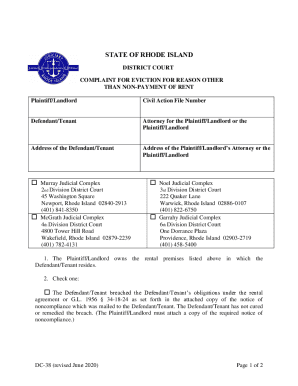
Filling out the RI DC-38 form for eviction can be straightforward when you understand each component of the document. This guide will provide you with step-by-step instructions for completing the form online, ensuring that you provide all necessary information accurately.
Follow the steps to complete the RI DC-38 form online:
- Press the ‘Get Form’ button to access the RI DC-38 form and open it in your chosen editor.
- Begin by filling in the details of the Plaintiff/Landlord, including their name and contact information.
- Enter the Civil Action File Number, which is essential for the court's record-keeping.
- Next, provide the name of the Defendant/Tenant and their address accurately.
- If applicable, include the name and address of the Attorney for the Plaintiff/Landlord.
- Select the appropriate Judicial Complex where you are filing the complaint by checking one of the options provided.
- State the grounds for eviction by checking the relevant box and adding any necessary documentation or notices as indicated.
- Specify the amount being claimed in damages and provide an explanation for the monetary claim in the designated space.
- Sign the form, including the Rhode Island Bar Number if you are an Attorney, and date the document.
- Review all the information for accuracy before proceeding to save changes, download, print, or share the form.
Complete the RI DC-38 form online today for a seamless filing experience.
Related links form
If you pay rent monthly, you must be given a thirty-day notice of termination. If you pay rent weekly, you must be given a ten-day notice of termination. If you have not moved by the day specified in the notice, the landlord may begin court proceedings to evict you.