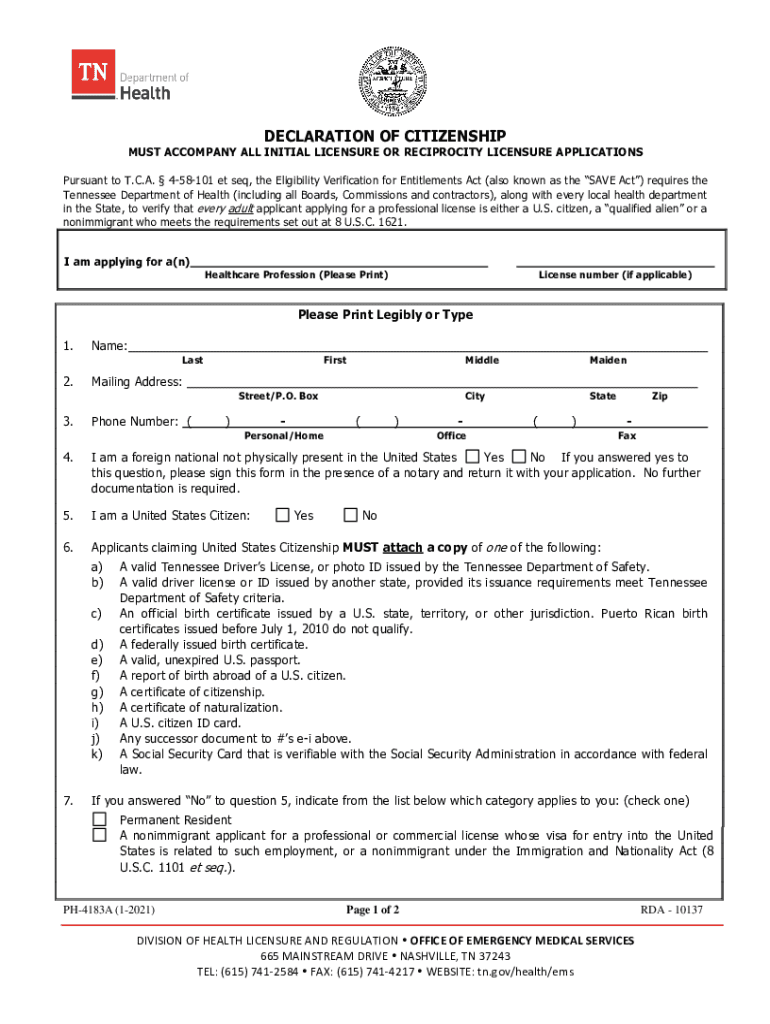
DECLARATION OF CITIZENSHIP MUST ACCOMPANY ALL INITIAL LICENSURE OR RECIPROCITY LICENSURE APPLICATIONS Pursuant to T.C.A. 458101 et seq, the Eligibility Verification for Entitlements Act (also known.
Loading

Open form follow the instructions

Easily sign the form with your finger

Send filled & signed form or save
How to fill out the TN DoH PH-4183A online
Filling out the TN DoH PH-4183A form is an essential step for applicants seeking a professional license in Tennessee. This guide provides users with clear instructions on how to accurately complete the form online, ensuring a smooth application process.
Follow the steps to properly complete the form.
- Press the ‘Get Form’ button to access the TN DoH PH-4183A form and open it in your online editor.
- Begin by entering your name. Ensure you fill out the last, first, and middle name fields clearly. Provide any maiden name if applicable.
- Fill in your mailing address, including street or P.O. Box, city, state, and zip code.
- Enter your phone number in the designated fields, ensuring you include both personal/home and office numbers, if available.
- Indicate if you are a foreign national not currently present in the United States by selecting 'Yes' or 'No'. If 'Yes', remember to sign the form in the presence of a notary.
- If you identify as a United States citizen, attach a copy of one of the acceptable forms of identification listed in the guidelines. Check 'Yes' or 'No' to confirm your citizenship status.
- If answering 'No' to U.S. citizenship, select the appropriate category from the list that describes your status.
- For applicants claiming qualified alien status, submit two forms of documentation of identity and immigration status, as specified.
- Ensure that you complete the affirmation section, signing and dating the form where indicated. This must be notarized.
- Once all fields are completed, save your changes, and consider downloading or printing the form for your records. You can also share the filled form as necessary.
Start completing your TN DoH PH-4183A form online today for a convenient licensure application process.
Experience a faster way to fill out and sign forms on the web. Access the most extensive library of templates available.
Related content
§ 4-58-101 et seq, the Eligibility Verification for Entitlements Act (also known as the...
Linda Meyers, Ph.D. Acting Director. Office of Disease Prevention and Health Promotion...
TRP/PC = Ph~$ical error Program Counter of the code whiCh caused a trap. ... t.N 'RTS RS'...
Use professional pre-built templates to fill in and sign documents online faster. Get access to thousands of forms.
If you believe that this page should be taken down, please follow our DMCA take down process here.