Loading
Form preview
  • US Legal Forms
  • Form Library
  • Industry Forms
  • Industry Insurance & Medical Forms
  • Metlife Gr-tr-bene-emp1 2016

Get Metlife Gr-tr-bene-emp1 2016-2026

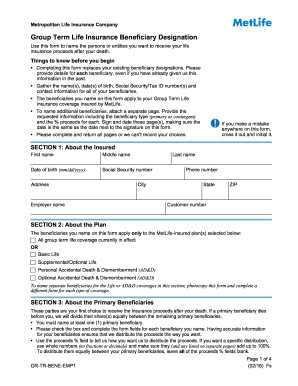
Dd/yyyy) City State Phone number Write in the % of proceeds assigned to this person % C Address Social Security number Gender M F % B Address Social Security number Gender M F Write in the % of proceeds assigned to this person ZIP Relationship to Insured Your Estate – If you name your Estate as a primary beneficiary, you cannot name a contingent beneficiary. Write in the % of proceeds assigned to this person % D Proceeds % Testamentary Trust created in your Will – The trust .

How it works

  1. Open form

    Open form follow the instructions

  2. Easily sign form

    Easily sign the form with your finger

  3. Share form

    Send filled & signed form or save

How to use or fill out the MetLife GR-TR-BENE-EMP1 online

This guide provides clear instructions for completing the MetLife GR-TR-BENE-EMP1 form, which is essential for designating your beneficiaries for group term life insurance. Follow the steps outlined below to ensure accuracy and compliance with MetLife's requirements.

Follow the steps to successfully complete your beneficiary designation form.

  1. Click ‘Get Form’ button to obtain the form and open it for editing.
  2. Section 1: About the Insured. Fill in your first name, middle name, last name, date of birth, Social Security number, and address. Make sure to provide accurate contact information including phone number and customer number.
  3. Section 2: About the Plan. Select the type of MetLife group term life coverage you want to apply the beneficiary designation to. You may choose all coverage or specific types like Basic Life or Supplemental Life.
  4. Section 3: About the Primary Beneficiaries. Name at least one primary beneficiary. Complete all requested fields including their name, date of birth, address, Social Security number, gender, and relationship to you. Specify the percentage of proceeds for each beneficiary. Ensure that the total percentages equal 100%.
  5. Section 4: About the Contingent Beneficiaries. If you wish to designate contingent beneficiaries, complete this section. Provide similar information as in the previous step, ensuring that the total percentage also equals 100% for this group.
  6. If applicable, fill out Section 5: About your Trust/Charity/Organization Beneficiaries. Include all requested information about any trust or charity listed as a beneficiary.
  7. Section 6: Signature required. Print your name, sign the form, and indicate the date completed. Ensure that you have also checked any factors like the percentage totals and corrections made.
  8. Finally, in Section 7, ensure you submit the completed form to your employer or benefits administrator, and retain a copy for your records.

Complete your MetLife GR-TR-BENE-EMP1 form online today to ensure your beneficiaries are designated accurately.

Get form

Experience a faster way to fill out and sign forms on the web. Access the most extensive library of templates available.
Get form

Related content

Group Term Life Insurance Beneficiary Designation
Things to know before you begin. • Completing this form replaces your existing...
Learn more
Group Term Life Insurance Beneficiary Designation
GR-TR-BENE-EMP1 (10/12) Fs. CONTINGENT BENEFICIARY - Your second choice to receive your...
Learn more

Related links form

Uniform Residential Loan Form Pdffiller Prevention Of Harassment Letter 2020 Pet Application Form For Rental Pdf Pleading Paper

Questions & Answers

Get answers to your most pressing questions about US Legal Forms API.

Contact support

Deciding whether your child should be a primary or contingent beneficiary depends on your family structure and financial preferences. If you trust your child to handle funds responsibly and they are of age, a primary designation may be appropriate. Conversely, if you want to ensure a secondary layer of protection, naming another reliable adult as the primary might be best, with your child as the contingent beneficiary.

When filling out a life insurance beneficiary form for your MetLife GR-TR-BENE-EMP1, gather all necessary personal and beneficiary information beforehand. Clearly state your primary and contingent beneficiaries, including their relationships to you. This careful documentation helps facilitate a frictionless claims process in the future.

Filling out beneficiary details on your MetLife GR-TR-BENE-EMP1 policy involves providing complete names, birth dates, and contact information. It’s essential to double-check the spelling to prevent any delays in processing claims. Clarity in these details will ensure that your beneficiaries receive their benefits without unnecessary complications.

To fill out a beneficiary form for your MetLife GR-TR-BENE-EMP1, start by entering your personal information such as your name and policy number. Next, clearly identify your beneficiaries by including their names, relationships to you, and contact information. Ensure you understand the implications of each designation to avoid confusion during claims.

In the beneficiary type section of your MetLife GR-TR-BENE-EMP1 form, specify whether your beneficiary is a primary or contingent beneficiary. A primary beneficiary receives the benefits first, while a contingent beneficiary only receives them if the primary beneficiary is unable to do so. This helps ensure your wishes are honored and provides a clear distribution plan.

When deciding on a beneficiary for your MetLife GR-TR-BENE-EMP1 policy, avoid naming individuals who may have conflicting interests, such as minors or people who are financially irresponsible. Additionally, it’s wise to avoid naming someone who might not outlive you, as this can complicate the claims process. Consider your relationship and their ability to manage the funds responsibly.

A contingent beneficiary is not strictly required for your MetLife GR-TR-BENE-EMP1 policy, but it is highly recommended. Having a contingent beneficiary provides an additional layer of security, ensuring your benefits are distributed according to your wishes if the primary beneficiary is unavailable. This proactive step helps to avoid complications and ensures that the financial support you plan for your loved ones reaches them without undue delay.

To add a beneficiary to your MetLife GR-TR-BENE-EMP1 insurance policy, you can typically do this online or by contacting MetLife directly. You will need to provide the necessary personal information for the new beneficiary and may need to fill out a specific form. This simple process not only personalizes your policy but also ensures that your loved ones are covered according to your intentions.

If there is no contingent beneficiary named in your MetLife GR-TR-BENE-EMP1 policy, the proceeds will typically go to the primary beneficiary or be directed according to your estate plan. This situation could complicate the distribution of your assets and may prolong the claims process, as additional legal considerations could arise. Therefore, it is wise to clarify these details when setting up your policy.

For a contingent beneficiary to receive proceeds under MetLife GR-TR-BENE-EMP1, two conditions must typically be met: the primary beneficiary must either be deceased or unable to claim the benefit. This coverage ensures that your intended beneficiaries receive the financial support you desire, even if the primary beneficiary is unable to fulfill their role. Moreover, understanding these conditions helps streamline the process for your loved ones.

Get This Form Now!

Use professional pre-built templates to fill in and sign documents online faster. Get access to thousands of forms.
Get form
If you believe that this page should be taken down, please follow our DMCA take down processhere.
Get MetLife GR-TR-BENE-EMP1
Get form
  • Adoption
  • Bankruptcy
  • Contractors
  • Divorce
  • Home Sales
  • Employment
  • Identity Theft
  • Incorporation
  • Landlord Tenant
  • Living Trust
  • Name Change
  • Personal Planning
  • Small Business
  • Wills & Estates
  • Packages A-Z
  • Affidavits
  • Bankruptcy
  • Bill of Sale
  • Corporate - LLC
  • Divorce
  • Employment
  • Identity Theft
  • Internet Technology
  • Landlord Tenant
  • Living Wills
  • Name Change
  • Power of Attorney
  • Real Estate
  • Small Estates
  • Wills
  • All Forms
  • Forms A-Z
  • Form Library
  • Legal Hub
  • About Us
  • Help Portal
  • Legal Resources
  • Blog
  • Affiliates
  • Contact Us
  • Delete My Account
  • Site Map
  • Industries
  • Forms in Spanish
  • Localized Forms
  • State-specific Forms
  • Forms Kit
  • Real Estate Handbook
  • All Guides
  • Notarize
  • Incorporation services
  • For Consumers
  • For Small Business
  • For Attorneys
  • USLegal
  • FormsPass
  • pdfFiller
  • signNow
  • altaFlow
  • DocHub
  • Instapage
Form Packages
  • Adoption
  • Bankruptcy
  • Contractors
  • Divorce
  • Home Sales
  • Employment
  • Identity Theft
  • Incorporation
  • Landlord Tenant
  • Living Trust
  • Name Change
  • Personal Planning
  • Small Business
  • Wills & Estates
  • Packages A-Z
Form Categories
  • Affidavits
  • Bankruptcy
  • Bill of Sale
  • Corporate - LLC
  • Divorce
  • Employment
  • Identity Theft
  • Internet Technology
  • Landlord Tenant
  • Living Wills
  • Name Change
  • Power of Attorney
  • Real Estate
  • Small Estates
  • Wills
  • All Forms
  • Forms A-Z
  • Form Library
Customer Service
  • Legal Hub
  • About Us
  • Help Portal
  • Legal Resources
  • Blog
  • Affiliates
  • Contact Us
  • Delete My Account
  • Site Map
  • Industries
  • Forms in Spanish
  • Localized Forms
  • State-specific Forms
  • Forms Kit
Legal Guides
  • Real Estate Handbook
  • All Guides
Prepared for you
  • Notarize
  • Incorporation services
Our Customers
  • For Consumers
  • For Small Business
  • For Attorneys
Our Sites
  • USLegal
  • FormsPass
  • pdfFiller
  • signNow
  • altaFlow
  • DocHub
  • Instapage
Social Media
Call us now toll free:
+1 833 426 79 33
As seen in:
© Copyright 1999-2026 airSlate Legal Forms, Inc. 3720 Flowood Dr, Flowood, Mississippi 39232
  • Your Privacy Choices
  • Terms of Service
  • Privacy Notice
  • Content Takedown Policy
  • Bug Bounty Program