Loading
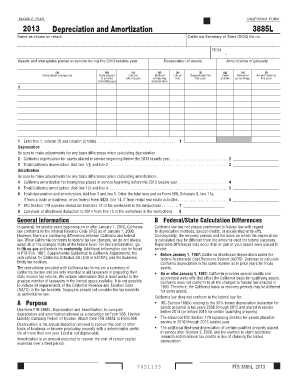
Get 2013 Form 3885l -- Depreciation And Amortization - Ftb Ca
How it works
-

Open form follow the instructions
-

Easily sign the form with your finger
-

Send filled & signed form or save
How to fill out the 2013 Form 3885L -- Depreciation and Amortization - Ftb Ca online
Filling out the 2013 Form 3885L for depreciation and amortization can be simplified by following this comprehensive guide. This form is essential for computing allowed deductions related to assets and intangibles placed in service during the taxable year.
Follow the steps to complete the form successfully.
- Press the ‘Get Form’ button to access the form and have it opened in your editing interface.
- Begin by entering your name exactly as it appears on your tax return, along with your California Secretary of State (SOS) file number and Federal Employer Identification Number (FEIN).
- In the section titled 'Assets and intangibles placed in service during the 2013 taxable year', provide a description of each property in column (a), the date placed in service in column (d), and the cost or other basis in column (e).
- Select the appropriate method of figuring depreciation in column (c) and input the life or rate in column (f). Calculate the depreciation for the year and write it in column (f).
- For amortization, indicate the code section in column (g) and specify the period or percentage in column (h). Enter the amortization amount for this year in column (i).
- Total the depreciation amounts from column (f) and the amortization from column (i) in the respective lines provided. Be mindful of adjustments for any basis differences when calculating totals.
- Finally, save your changes, download the form, or print for submission as required. You can also share it if necessary.
Complete your documents online to ensure an efficient filing process.
California does not conform to the federal special or bonus depreciation for qualified property acquired and placed in service. Election to Expense Certain Tangible Property (IRC 179).
Industry-leading security and compliance
US Legal Forms protects your data by complying with industry-specific security standards.
-
In businnes since 199725+ years providing professional legal documents.
-
Accredited businessGuarantees that a business meets BBB accreditation standards in the US and Canada.
-
Secured by BraintreeValidated Level 1 PCI DSS compliant payment gateway that accepts most major credit and debit card brands from across the globe.