E in writing, signed by me or on my behalf, and delivered to Hoag Hospital, Health Information Department, One Hoag Drive, Newport Beach, CA 92658. My revocation will be effective upon receipt, but will not be effective to the extent that the requestor or others have acted in reliance on this authorization. I have a right to receive a copy of this authorization. Information disclosed pursuant to this authorization could be re-disclosed by the recipient and might no longer be protecte.
Loading

Open form follow the instructions

Easily sign the form with your finger

Send filled & signed form or save
How to fill out the HOAG JIT 2363 online
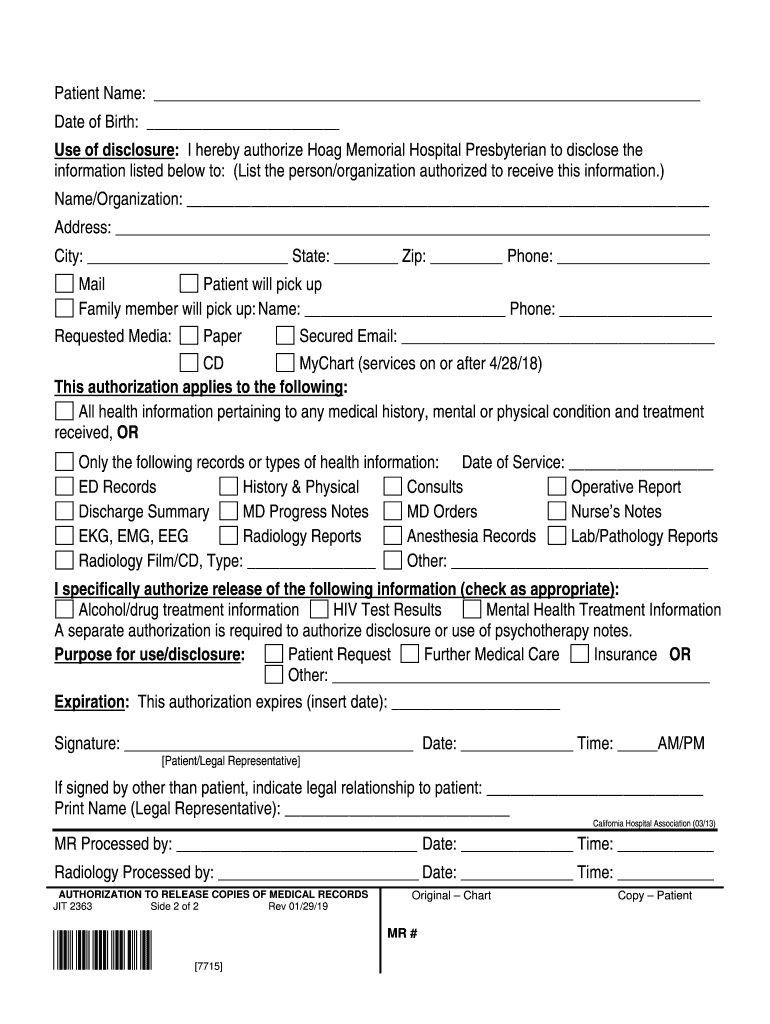
Filling out the HOAG JIT 2363 form is an important step in authorizing the release of your medical records. This guide provides clear and supportive instructions on how to complete the form online, ensuring that your personal health information is disclosed accurately and securely.
Follow the steps to fill out the form online:
- Click the ‘Get Form’ button to access the HOAG JIT 2363 document. This will open the form in a suitable editor for completion.
- Enter the patient’s name and date of birth in the respective fields at the top of the form. Ensure that the information is accurate to avoid any processing delays.
- In the ‘Use of disclosure’ section, indicate to whom you are authorizing the information to be disclosed. Write the name and organization in the appropriate field.
- Provide the address, city, state, zip code, and phone number of the person or organization that will receive the information.
- Select the option for how the information should be delivered, such as by mail, for pick-up by the patient, or by a family member. If applicable, fill in the name and phone number of the family member picking up the records.
- Choose the requested media format for the release of the records, such as paper, secured email, CD, or MyChart.
- Identify the specific health information being authorized for release. Check the appropriate options, ensuring you include any relevant dates of service and specific records or types of information.
- Indicate if you specifically authorize the release of sensitive information, such as alcohol/drug treatment information or mental health treatment information.
- Specify the purpose for which the information is being disclosed, selecting from options including patient request or further medical care.
- Fill out the expiration section to indicate how long the authorization is valid. Include an expiration date.
- Sign and date the form in the designated area. If a legal representative is signing, indicate their relationship to the patient and print their name.
- Once completed, review all entries for accuracy. Save any changes, download the finalized document, print it for your records, or share it as necessary.
Complete your documents online with confidence and ensure your health information is shared securely.
Experience a faster way to fill out and sign forms on the web. Access the most extensive library of templates available.
Related content
by DD Brunk · 1973 — This report contains the results of the observations and analysis...
2363 8d av... .Jordan & Moriarty. 103. Parmlee, G ... J. T. Hoag. Printing Offtce and...
Get answers to your most pressing questions about US Legal Forms API.
How to request medical records in Hoag?
Requesting medical records at Hoag involves a straightforward process to ensure your privacy and security. You can typically submit a request through the MyChart portal or contact their patient services directly for guidance. At HOAG JIT 2363, they prioritize patient accessibility and ensure you receive your necessary medical documentation efficiently.
Does Hoag have MyChart?
Yes, Hoag offers MyChart as part of its patient services. With MyChart, you can easily manage your appointments, access your health records, and communicate with your medical team. Utilizing this feature enhances your experience at HOAG JIT 2363 by keeping your medical information at your fingertips.
What is the phone number for Hoag customer service?
You can reach Hoag customer service at their dedicated phone number, which is available for any inquiries or support you may need. Their representatives are knowledgeable and ready to assist you with questions regarding services at HOAG JIT 2363. Ensuring you have the correct contact helps you access the resources you need efficiently.
What is Hoag MyChart?
Hoag MyChart is a patient portal designed to give you convenient access to your healthcare information. Through MyChart, you can view test results, request prescription refills, and communicate securely with your healthcare providers. This streamlined access to your health information is a part of the innovative services offered at HOAG JIT 2363.
What does Hoag mean?
Hoag refers to Hoag Memorial Hospital Presbyterian, a respected healthcare provider located in Southern California. The term embodies the commitment to providing high-quality medical care and services, including advanced treatment options. At HOAG JIT 2363, you experience this commitment firsthand through their dedicated services.
What is the difference between Epic and MyChart?
Epic is a comprehensive electronic health record system used by many healthcare providers, while MyChart is a patient portal integrated within the Epic system. With MyChart, patients can access their medical information, schedule appointments, and communicate with their healthcare team. Understanding the differences can enhance your experience at HOAG JIT 2363, allowing you to make the most of your healthcare options.
Is Hoag religious?
Hoag has a history of embracing a mission that reflects its community values, which may include spiritual care in its services. However, it operates primarily as a healthcare organization focused on delivering exceptional medical care. With the Hoag JIT 2363 framework, patients can expect a holistic approach to health that respects diverse beliefs while prioritizing quality treatment. This commitment ensures that everyone receives compassionate care tailored to their individual needs.
Why is Hoag leaving Providence?
Hoag is transitioning from Providence to enhance its commitment to patient care and community health. This decision follows a strategic plan aimed at aligning with local healthcare needs more effectively. Hoag JIT 2363 plays a crucial role in this transition by providing streamlined access to legal resources that support healthcare operations. As a result, this move allows Hoag to serve you better with improved healthcare services.
Where does Hoag Hospital rank?
Hoag Hospital consistently ranks highly among hospitals in California, thanks to its commitment to patient care and innovative practices. Various surveys and reports highlight its quality of service, which is supported by the principles of Hoag JIT 2363. These rankings reflect Hoag's dedication to excellence in healthcare delivery.
Does HOAG have an app?
Yes, Hoag offers a user-friendly app that supports patient engagement and access to information. Through this app, you can schedule appointments, view your medical records, and communicate with your healthcare providers seamlessly. The app's integration with the Hoag JIT 2363 initiative emphasizes convenience and accessibility for all patients.
Use professional pre-built templates to fill in and sign documents online faster. Get access to thousands of forms.
If you believe that this page should be taken down, please follow our DMCA take down process here.