Loading
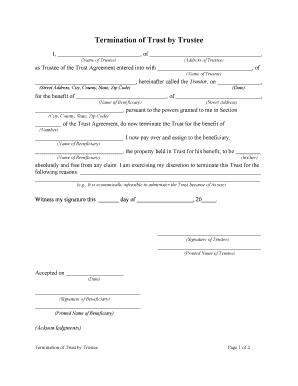
Get Termination Trustee
How it works
-

Open form follow the instructions
-

Easily sign the form with your finger
-

Send filled & signed form or save
How to fill out the Termination Trustee online
Filling out the Termination Trustee form can seem daunting, but with this guide, you will have clear steps to ensure accurate completion. This document is essential for formally ending a trust, and understanding each section will help facilitate a smooth process.
Follow the steps to complete the Termination Trustee form accurately.
- Click ‘Get Form’ button to obtain the form and open it for editing.
- Begin by entering the name of the trustee in the designated field. This is the person who has been managing the trust.
- Input the trustee's address, including street address, city, county, state, and zip code. This information is essential for identification.
- Next, provide the name of the trustor, who is the individual that initiated the trust agreement.
- Fill in the trustor's address, as you did with the trustee, to establish their location.
- Enter the date of the trust agreement. This date helps to clarify the timeline of the trust’s existence.
- Now, include the name of the beneficiary, who is the person intended to receive the trust's benefits.
- Complete the beneficiary's address to ensure all parties are appropriately informed.
- In the section regarding the termination reason, clearly state why you are terminating the trust. Be specific and concise.
- Sign and date the form in the signature area provided for the trustee.
- The beneficiary must also sign and date the form to acknowledge acceptance of the terminated trust.
- After filling in all sections, review your document for any errors. When completed, save changes and proceed to download, print, or share the form as necessary.
Get started on completing your documents online now!
Termination can also take place if a trustee violates their fiduciary duties such as stealing property or self-dealing. Contest termination. When beneficiaries file legal disputes or contests against the trust itself or another beneficiary.